
No news here: a customer database is a must for any company that wants to boost its sales.
But building a customer database is a huge job: from collecting the data to putting it to work, nothing can be left to chance, or you risk wrecking all the effort you’d already put in.
What is a customer database for? How do you gather and then manage customer data? Where do you store it? How do you make your customer database GDPR-compliant? Why have a customer database at all?
In this article, we give you a complete guide to the customer database.
Customer database: a definition

You read pretty much everywhere that a customer database is a list of customers with first names, last names, dates of birth and who knows what else that has no use and no importance.
So far, it’s fairly simple. We could have handed you an Excel template with 4 columns, but we figured there were enough of those on the web already.
It gets a bit more complicated when you get into the nitty-gritty of the data points you want to identify: purchase date, last visit to the website, last email opened, last phone conversation, birthday, etc.
All this data is so varied that it’s easy to drown in it.
Fortunately, in real life, a customer database is usually made up of several tables, and right away it’s much simpler than people would have you believe:
- A customers table: here we’re talking about companies, this is B2B. That’s where you put the company registration number (the SIREN in France), the billing address, etc.
- A sales table: the “orders” table of e-merchants. For everyone else it’s usually called “invoices”. It’s the list of every sale made. Note that the customer’s name (or an ID) is usually carried over into it, along with the amount, the SKU if applicable, etc.
- A contacts table: your mobile phone or your mailbox, or both. Here we’re talking about humans, people. That’s where you can put birthdays, the children’s first names and the phone number.
You can of course add as many tables as you like, to go much (much) further in customer knowledge. For example a “Marketing” table with every ebook downloaded, every form filled in, etc., or a “Website” table with every visit to the website, each page viewed, the exact date, etc.
But with these 3 tables alone, you already have what you need to build very advanced and very effective CRM processes, and you’ll easily get a real view of your relationship with each of your customers.
The mistake is trying to build a customer database on a single table, mixing customers, contacts and sales together.
Go further
Customer database: what are the benefits, and for which goals?

1. Transactional approach VS relationship approach
In a transactional approach, the customer database doesn’t exist: all you have is a list of sales and an address book.
If you’re a fan of The Office, they’re deep in transactional mode: the goal is to sell as many reams of paper as possible. That’s the company’s objective, it’s the reps’ individual objectives, etc.
But for twenty years or so, people have been thinking more and more about the notion of customer value. In fact, the reasoning is already implicit in The Office – a good customer is a customer with recurring, large needs for paper – but the idea here is to formalize it properly.
That’s the main goal of the customer database: formalize the business potential of existing customers and turn it into a real company asset, rather than the business of the sales reps who each handle it their own way.
2. Optimize your prospecting
We often feel we know perfectly well who our target audience is.
But focusing on the idea you have of your customers rather than serving your real customers is the surest way to miss the target one way or another. The worst-case scenario: the people you’re targeting don’t exist – and you end up offering products and services nobody wants.
By exploring every detail of your target audience, you know for certain that there’s a market for your brand and that the value you offer will be appreciated by that audience.
That means a better return on investment from your marketing campaigns, because better targeting lets you:
- Create targeted content that sparks your audience’s interest and resonates with them, because you’ll be able to identify the content format that works best (written, multimedia, long or short, etc.) for each of your marketing channels and determine whether the content prompts users to take the desired action.
- Send more relevant and timely emails thanks to better segmentation and personalization.
- Improve your ad campaigns with a better understanding of which channels to place media on, and of the best way to retarget customers based on their previous behavior.
Go further
3. Optimize your pricing
The idea is to create value on your product: in the graph below, “Willingness To Pay” is the hypothetical maximum price a customer would be willing to pay for a good. Cost of goods is the accounting term for what it costs you to make a product.
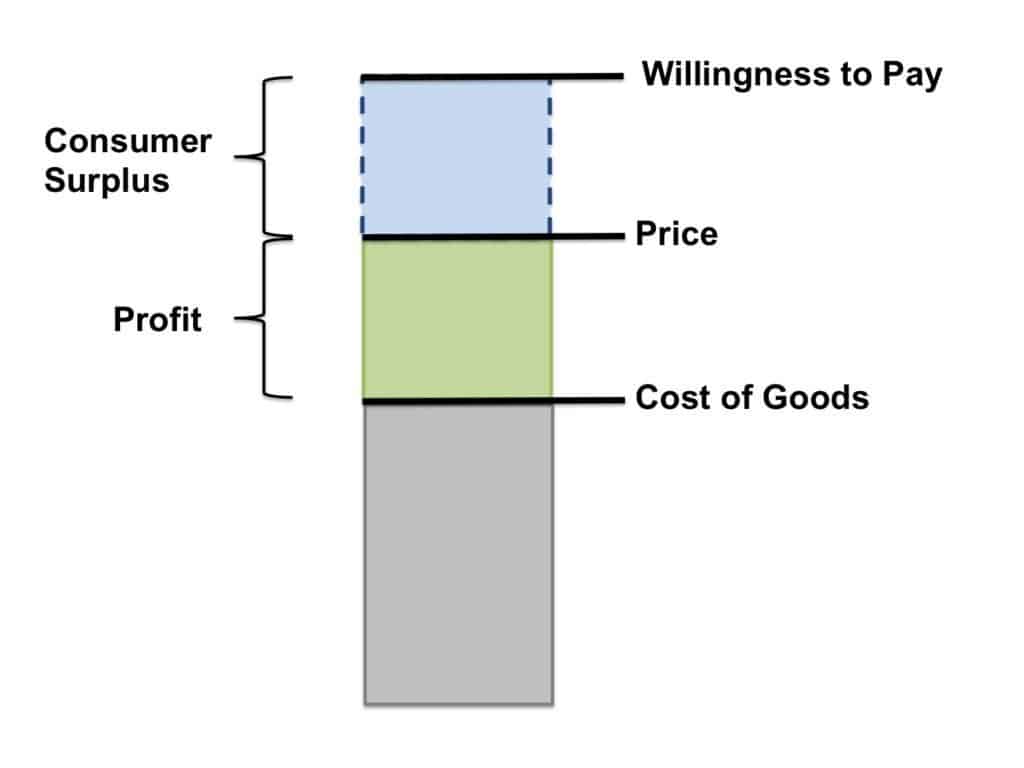
But the key element of this diagram is the two terms on the left. That’s the “value”. The first is the “consumer surplus”. The gap between what you actually have to pay and what you would pay is the benefit you receive. The gap between the price and the cost of making the product (and all the company’s running costs) is the company’s margin, or net profit. That’s the value for the company, its owner and its shareholders.
From there, and this is no news to you, it’s super important to have a clear and complete pricing strategy, one that will therefore take broad account of how your audience perceives your products.
The key point is that each customer has a different “maximum acceptable price”. If you know exactly what your customers are looking for – and how much they’re willing to spend to get it – you can optimize your price lists to get the most value out of your various products and services.
Salesdorado’s takeIt also lets you outdo your competitors without undercutting them and without giving up potential profits. In fact, you’re able to offer your customers the value they expect at a price they’re willing to pay, while maximizing your profits.
4. Grow customer referrals
Providing first-rate support and customer service should always be a top priority for your team.
But if you only become aware of their needs when they run into a problem – and have contacted you – you’re very likely to lose them. Not only will they be annoyed at having to contact you, but you won’t be able to help them when they do.
Here again, your customer data plays an important role.
First of all, your team will be equipped to handle every problem your customers bring to you. If you know the main areas where your audience tends to struggle, you can strengthen your ability to help them all along their journey.
You can also focus on removing those difficulties altogether. Of course, your support staff will probably have to step in at certain points, but by providing proactive support before customers run into difficulties, you’ll let them carry on toward success with as little friction as possible.
Go further
How do you build and use your customer database?
CRM requirements templateWe’ve put together a complete CRM requirements template with a detailed example. The template has 6 parts:
- Presentation of the context
- Presentation of the current CRM setup
- Presentation of the project’s objectives
- Functional requirements grid
- Details of non-functional needs
- Project organization
It’s free, and it’s right this way 👇
1. Make your objectives operational
Before you start collecting every piece of customer data you can, you need a clear idea of what you expect from the process.
If you neglect this crucial step, your team is likely to face a number of data-related problems, for example:
- Collecting an overwhelming, unmanageable amount of data.
- Collecting irrelevant or unusable data
- Misinterpreting data that would otherwise have been useful.
Basically, you don’t want to collect customer data just for the fun of it – or on the assumption that you’ll know what to do once you’ve collected the information.
That doesn’t mean you’ll know exactly what you need to improve before gathering more data from your customers.
(If you knew what to do from the start, you wouldn’t need more data on your customers, would you?)
But your team should be able to identify the specific gaps in your operations based on its experience with your customers, as well as its expertise within your organization.
Data on your company’s performance plays an important role here. Whether you’re missing certain key performance indicators or there’s clearly room for improvement, you need to determine the specific area on which to focus your data collection efforts going forward.
Overall, this step is about making sure that the improvements you make to the customer interface deliver worthwhile results for your company. While being more customer-centric is always a top priority for your business, doing it without regard for your business objectives is simply unsustainable.
So before you even start thinking about what more you can do for your audience, you need a fairly clear idea of how those improvements will lead to your company’s growth.
2. Identify the key data points
Once you’ve defined what you want to focus on, you need to determine the specific customer data required to make the necessary improvements.
All the data you collect from your customers can prove valuable one way or another. However, it’s important to focus on the data and metrics that matter – both for the customer experience and for your business objectives – so you make improvements that move the needle in the right direction for everyone involved.
(You also need to tell the difference between this more meaningful data and what are called “vanity metrics”, which don’t tell you all that much about your customers’ needs and/or their experiences with your brand.)
The key to identifying this data: the customer journey.
The goal here is to determine how your customers engage with your brand throughout their buying journey. You’ll then know where to look when you collect customer data, and you can start focusing on which data to collect from each of these sources.
In many cases, the data already exists and you just need to uncover it. When it doesn’t, you need to turn to your customers or to other sources to get the information you need to move forward.
There are four types of data – here’s a quick overview of the situation:
- So-called “zero-party” data: this is information your customers give you voluntarily and knowingly: their preferences, their answers to a survey or a qualification form, the interests they declare. That is the definition from Forrester, which coined the term (source).
- “First-party data”: this is the data you collect yourself over the course of the relationship, and which is therefore owned by your company: purchase history, exchanges with sales reps, support requests, behavior on your website or in your emails.
- “Second-party data”: this is another company’s first-party data, which it shares with you or sells to you directly, as part of a partnership for example. A software vendor whose product complements yours can, for instance, cross-reference its customer base with yours to spot shared accounts.
- “Third-party data”: it is collected and published by research organizations, usually in state-of-the-industry reports or similar documents. They help you identify industry standards in terms of customer expectations and overall business performance, and then assess your company’s ability to meet those standards.
Whatever customer data you’re looking to collect, it’s essential that you take into account all the sources and types of data available. Otherwise, you always run the risk of missing important information that could have changed the course of your business.
3. Define the methods for collecting these data points
To take stock:
- You know what you’re trying to achieve with the customer data you plan to collect.
- You know which data you need to focus on, and where you can find it.
- Now you actually need to collect the data and get it ready for practical use.
That’s where technology comes in.
With the right tools, your team can tap into more customer data than ever – and use it to better meet your target audience’s needs.
We start with data collection:
- Chatbots and behavioral analytics tools: to automatically collect your customers’ data from their actions on your website.
- Survey software, help desk and ticketing tools: basically, these are all the ways to gather customer feedback, and therefore information about them.
- Social media monitoring tools: to collect information on the web about your brand, your target audience and your industry as a whole.
The next step is to organize the data you collect on your customers so it’s accessible and usable by your team. Without this step, the valuable data you gather can easily slip through the cracks – making your efforts useless.
Overall, modern customer relationship management tools ensure that your customers’ data ends up in a centralized place, where your team can access it for all kinds of purposes.
AI-powered CRMs can also help you organize your customer data in a new way and so uncover valuable insights that can help you optimize your efforts going forward.
As you glean these insights from your customer data, you’ll need to synthesize them into organizational knowledge for practical use. Software streamlines your team’s ability to document, store and share this information across the company, which helps every customer-facing team better understand your audience.
Nowadays, using technology is non-negotiable when it comes to gathering and using customer data. The right tools not only streamline (and often automate) your data processes, they also let your team do much more with the data it collects.
Go furtherThe idea is to automate your data collection processes as much as possible. If you want to know more, we’ll point you to these articles right here:
4. Put your customer data to work
Once you’ve collected, organized and assessed your customer data, it’s time to put it to work. And that’s where many companies fail.
To be frank, there’s no point doing the work needed to understand what your customer data is telling you if you’re not ready to act on it afterward.
Of course, how you use the data depends on each situation and each organization. In reality, the goal is more to stay agile and let this data steer your efforts in the right direction.
In other words, there’s no single way to use the data you collect on your customers.
That doesn’t mean, though, that you should dive blindly into data-driven actions.
Instead, you need to systematize your data-driven processes to get the most out of the information you’ve gathered.
By developing standard operating procedures (SOPs), you’ll give your team the means to take consistent, strategic action at all times – no matter what the data in question is telling you.
(Conversely, if you take a haphazard approach to your data-driven processes, your team can easily go off track one way or another – overlooking certain data points, making unfounded assumptions, etc.)
This systematic approach should in some way mirror the scientific method:
- Create a hypothesis about the outcome, based on the data available.
- Test a specific improvement or change to your internal processes
- Assess any change in the customer or performance data you’re focusing on.
- Make the necessary improvements based on your results, so that both your customers and your company benefit.
Whether you’re running A/B tests on your email content or your ad campaigns, setting up dynamic pricing for specific products or making improvements to your products, a systematic approach is essential to ensure your results are accurate and reliable.
With standard operating procedures in place, you spend less and less time wondering what to do with the customer data you collect. That leaves you even more time to make improvements that matter to your customers and your retail business.
5. Iterate, iterate, iterate
As in every area of your business, it’s important to keep improving your data-driven processes.
(In fact, it’s these improvements that will let you make continuous improvements to the other areas of your business.)
There will always be more data to collect on your customers. Always more ways to collect the data you need. Always more insights to glean from the data you collect. And you’ll always be able to do more to better serve your target audience.
So as you keep building your ability to use your customers’ data for practical purposes, you should always assume there’s still work to do.
This can mean regularly assessing new data sources, investing in an emerging technology or strengthening your data analysis capabilities. Whatever it means in your specific situation, it’s important never to lose sight of what more you can do.
It’s simple: if you’re not constantly looking ahead, you’ll miss countless opportunities to deliver value to your customers. With most B2B companies becoming more and more data-driven, simply maintaining the status quo will quickly leave your company outpaced by the competition.
Keep your customer data front and center at all times, and you’ll always know the best way forward.
Watch outBe careful not to make the mistake of thinking data is objective. The collection methods and the points collected must be guided by a strong intuition or hypothesis. As the organization matures, data collection costs are estimated better and better, and you need to look for increasingly efficient iterations.
Go furtherTo wrap up this part, here are a few articles to help you enrich your customer database:
Where and how should you store your customer data?
CRM requirements templateWe’ve put together a complete CRM requirements template with a detailed example. The template has 6 parts:
- Presentation of the context
- Presentation of the current CRM setup
- Presentation of the project’s objectives
- Functional requirements grid
- Details of non-functional needs
- Project organization
It’s free, and it’s right this way 👇
Method 1: A customer database in Excel
We won’t insult you by providing an Excel template for a single-table list, that would be ridiculous.
What you really need to remember about the customer database is that what matters isn’t at all the exhaustive list of customers, but rather easy access to aggregated information on your customers at a glance.
For example, the amount each of your customers has spent over the last 12 months.
Or the marketing channel through which each customer found you.
You can feel the Excel file has just grown in complexity, and we always end up coming back to the eternal CRM triptych:
- A customers table
- A contacts table
- A sales table (orders)
Building your customer database in Excel (or Airtable, Notion, etc.) therefore quickly amounts to building your own CRM, which we really (but really) don’t recommend at all.
Go furtherIf you’re looking for a light, easy-to-set-up solution to build a customer database and bare-bones CRM processes, take a look at our comparison of free CRM software and open source tools, ranging from Google Sheets templates to the biggest open-source CRM/ERP solutions.
Method 2: Use a CRM for your customer database
The next step in CRM management is automating the collection and updating of your customer data.
For example, in our Excel file, for the column “Amount spent over the last 12 months”, we’d like it to update automatically. We’d even like another column with the date of the last purchase. And maybe even the amount of the last purchase.
Excel (and the like) will work for a while, but CRM software can add a lot of value fairly quickly, by automatically collecting and organizing information into customer records and custom reports.
At first, the simplest thing (by far) is to feed a CRM with all the data you consider relevant. Depending on your business, you’ll lean toward:
- A transactional CRM: these are CRMs built around sales opportunities, like Pipedrive for example. Every sale is an opportunity before it becomes a sale, and the CRM lets you track every sales opportunity at a glance. Go for it if the hardest part is closing sales. Pipedrive is clearly the leader in this segment, and for good reasons.
- A marketing CRM: These are really marketing automation tools, built around direct communications with your customers. E-merchants rarely need any other type of CRM. Go for it if the hardest part is being seen or noticed. If you’re not equipped yet, look at ActiveCampaign or Brevo (formerly Sendinblue).
- A relationship CRM: Here we mean software like Intercom or Zendesk, which are very focused on the human exchanges (live chat, email, etc.) your customers have with your teams. Go for it if the hardest part is the operational relationship with the customer. For example the migration to your CRM solution, or onboarding new users, etc. If you’re not equipped yet, Intercom is still the benchmark, at a benchmark price: check first whether your CRM already offers live chat.
- A sales CRM: These are the more classic (and more complete) CRMs like Salesforce or Hubspot, but they remain focused on the sales view of the customer (and not at all the operational one, for example, where Zendesk or Intercom make sense).
Go furtherWe could talk to you about CRM for hours, which is why we’ve written a good number of ultra-complete articles on it:
Method 3: CDPs – Customer Data Platforms
But sooner or later, you’ll want to connect everything. Your marketing sources, your sales opportunities and the operational exchanges on live chat.
The 360° view of the customer, the real one.
That’s the idea behind CDPs – Customer Data Platforms – very much in fashion for a few years now.
Without going into too much detail, let’s mention Segment, which is doing a lot to popularize the concept. The principle is fairly basic at heart: CDPs are to your customer data what pipework is to plumbing. CDPs are what let you segment, route and aggregate data, to use a real customer database – this one decidedly more complex and complete – in real time, or almost.
A word on the GDPR and cybersecurity
The GDPR isn’t limited to the famous banner for collecting consent to use cookies. The foundation of the GDPR is being able to justify the collection of data, store it securely and delete it at the request of the person concerned.
The GDPR is almost exclusively about personal data. Anonymized data (the simplest form of anonymization is aggregation) isn’t covered. To save yourself a lot of headaches, always prefer anonymous reading keys whenever possible.
A few points to remember:
- In the case of a customer database, the legal basis for collection is almost always the contract.
- You can only collect the information strictly necessary for the business relationship. The data collected must be “adequate, relevant and limited”. In practice, these principles obviously concern personal data much more than company data.
Avoid sensitive data such as health data or political or religious opinions – collecting and processing this data is prohibited, with some exceptions.
Watch outIn principle, nobody is interested in this data for sales purposes. But notes taken during a phone call are a much grayer area, for example, since the prospect or customer may give you information you didn’t ask for. Recording this data is prohibited by law.
- Step 1: You need a record of the personal data processing you carry out. It must contain:
- the parties involved in processing the data;
- the categories of data processed;
- what the data is used for (purpose of processing)
- who accesses it and who it is shared with;
- how long it is kept;
- how it is secured.
The simplest thing, by far, is to limit personal data processing.
Salesdorado’s tipIn B2B, we’re lucky to deal with companies, which limits personal data from the outset. If you store all your sales data in a “company” table rather than a “contact” table, you considerably limit your exposure to the GDPR.
- Step 2: You must respect the rights to information, rectification, erasure, access and portability. Basically, you need to be able to update, show, delete or transfer anyone’s personal data (if you hold any information).
In practice, this means you need a very precise record of where the different pieces of customer data are stored. Excel, CRM, emailing software, help desk: the list can quickly get long.
Salesdorado’s tipStore all the data in one place, and make do with a key (anonymous if possible) everywhere else. For example, your CRM holds all the information you want to collect on a customer, and everywhere else you only have the ID of the CRM entry. If you want to make a change, you only have to do it once. If you want to show the data collected, you only have one data source. And if you want to delete the entry, deleting the CRM entry is enough, since everything else will in effect be anonymous once the CRM ID no longer matches anything.
We’ll point you to this very complete source from the French government (in French): How to make your customer database GDPR-compliant: a user guide
Can you buy a customer database?
Who hasn’t dreamed of getting hold of their main competitor’s customer database?
The expression is actually a misnomer, referring to buying a prospecting list. A rather optimistic view of prospecting, no doubt, which assumes the contacts in the list are bound to become customers.
Go furtherOn this subject, we’ll point you to all our fairly complete articles on what’s at stake in buying a customer database:
- Buying a prospecting list: read the guide first ⚠️
- Buying or renting a prospecting list: how much does it cost?
- Comparison of B2B database providers
Note all the same that in the software world, it’s fairly common and easy to get a list of users of competing solutions. Tools like Builtwith let you get lists of sites that use a given tool. Not quite a customer database, but not far off!