
There always comes a time, as a company grows, when the CRM solution in place no longer meets its needs and shows its limits. That is when the question of migrating the CRM comes up.
This article focuses on migrating your CRM to Salesforce. Salesforce today offers one of the most mature CRM solutions on the market, and it is often the choice companies with advanced needs turn to.
One of Salesforce’s strengths is that this CRM is actually more than a CRM, since it can also handle marketing functions (via Marketing Cloud) and ERP functions (using the AppExchange).
If you are considering migrating your CRM to Salesforce, you are in one of the following two cases:
- Rare case: you are starting from “nothing”, you don’t have a CRM worthy of the name, or rather you use Excel to manage your customer relationships and your sales processes.
- Most likely case: you use a CRM solution from the market (such as HubSpot or Pipedrive) but it no longer satisfies you and doesn’t let you roll out all the use cases you want.
Whichever case you are in, this article is for you. It covers the main topics to address in a CRM migration to Salesforce.
1. Map the data to migrate
In my work as a Salesforce integrator at Cloud Girafe, I often handle CRM migration projects to Salesforce. We always start projects with an in-depth assessment of the client’s needs and of how the current CRM works.
This preliminary work produces a file that will be essential throughout the project: the data dictionary. The purpose of this document is to map all the fields and attributes used in the client’s current CRM (HubSpot, Pipedrive, Freshsales or other) and to match them with the customizable data model offered by Salesforce.
It is important to be supported by an integrator during this step. The most effective method is to reuse as many standard fields as possible in Salesforce rather than creating custom fields. Standard fields will give you greater compatibility with the modules and AppExchange apps you install later on.
It is also important to have an integrator explain the Salesforce data model to you, so you don’t reinvent the wheel. For example, I often see implementations where someone creates an “Address” object to manage addresses, when the standard data model already offers a multitude of functions to handle address-type data.
2. Define the target processes
Alongside the data dictionary, you should qualify the sales processes you want to manage in Salesforce.
The simplest approach is to follow the Lead-to-Cash lifecycle and describe the sales funnel from the different points of view within your company. Here again, having an integrator on board will save you precious time and keep you from piling up technical debt. As an anecdote, I had a case where the Opportunity object had been completely reprogrammed to save a few licenses – a saving that turned out to have heavy consequences a few years later, when the tool became the cornerstone of the information system.
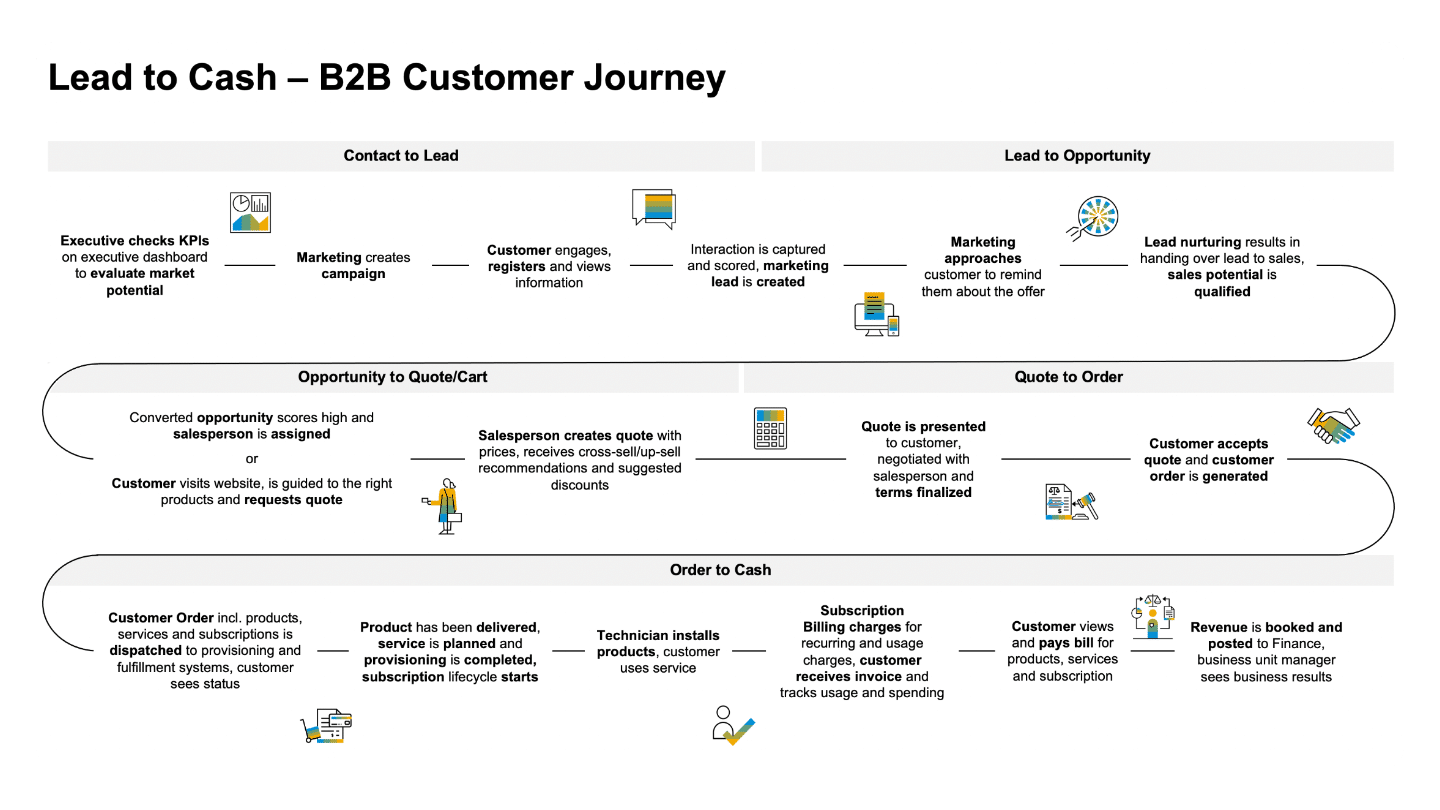
I am also wary of “like-for-like” migrations with a hyper-detailed specification. Before trying to reproduce your processes identically in Salesforce, I advise you to first look into these processes and adapt them so they stay close to the way you currently work.
Here is an anecdote I lived through: during a CRM migration, the client stated in the specifications that they never wanted more than 5 contacts created under an account. Since Salesforce has no such cap, we had to set up a process to count the contacts and block creation once the maximum was reached.
Nobody could ever explain the reason for this constraint to us, despite our many questions. It eventually turned out that the old CRM was capped at 5 contacts per account. It was simply a limitation of the tool. And unfortunately it was reproduced identically in Salesforce.
3. Define the target users (statuses and permissions management)
In any project migrating to a new CRM like Salesforce, one of the key steps is to define the target users and the scope of each type of user. Who can create or delete an account? Who can generate or approve a sales opportunity? More generally: who can do what, and who can access what? You need to take the time to define each person’s profiles and rights (access, read, write).
The typical user profiles used in a CRM are the following:
- Administrator: Has all the rights needed to manage and configure the system. This profile already exists and generally needs no changes.
- Sales rep: Able to create sales opportunities, generate quotes, etc. This profile is essential for sales teams.
- Sales administration (sales ops): Has the same rights as the sales rep profile, but with additional rights to access the accounts’ financial information, as well as data related to orders, contracts and subscriptions.
- Access management for the VP Sales. For the VP Sales, it is advisable to use the basic sales rep profile and add specific rights through additional permissions. This method keeps profile management simple while tailoring access to strategic needs.
It is advisable to limit the number of different profiles to simplify system maintenance. Every new field or feature added must be carefully examined from the standpoint of access rights, to avoid unnecessary complexity.
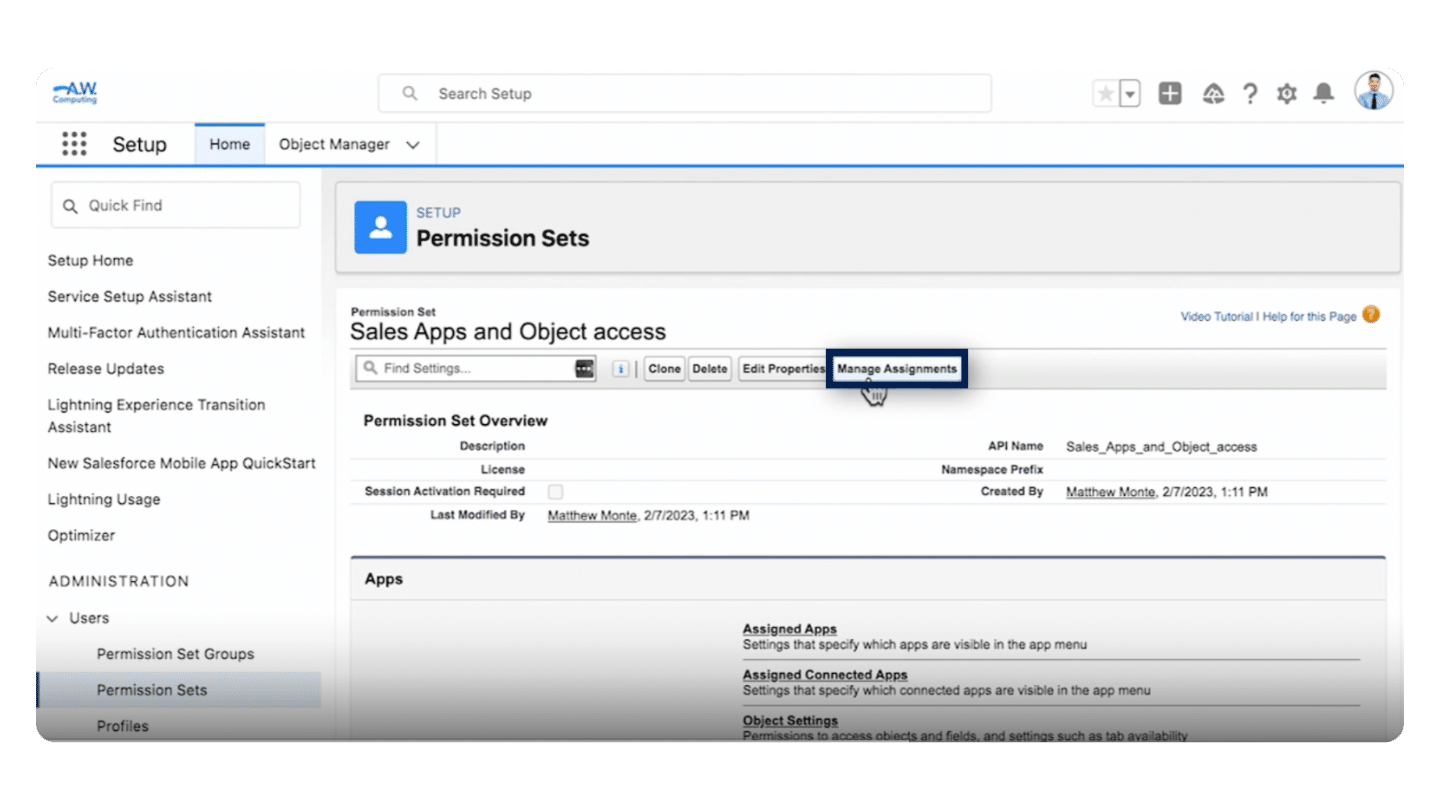
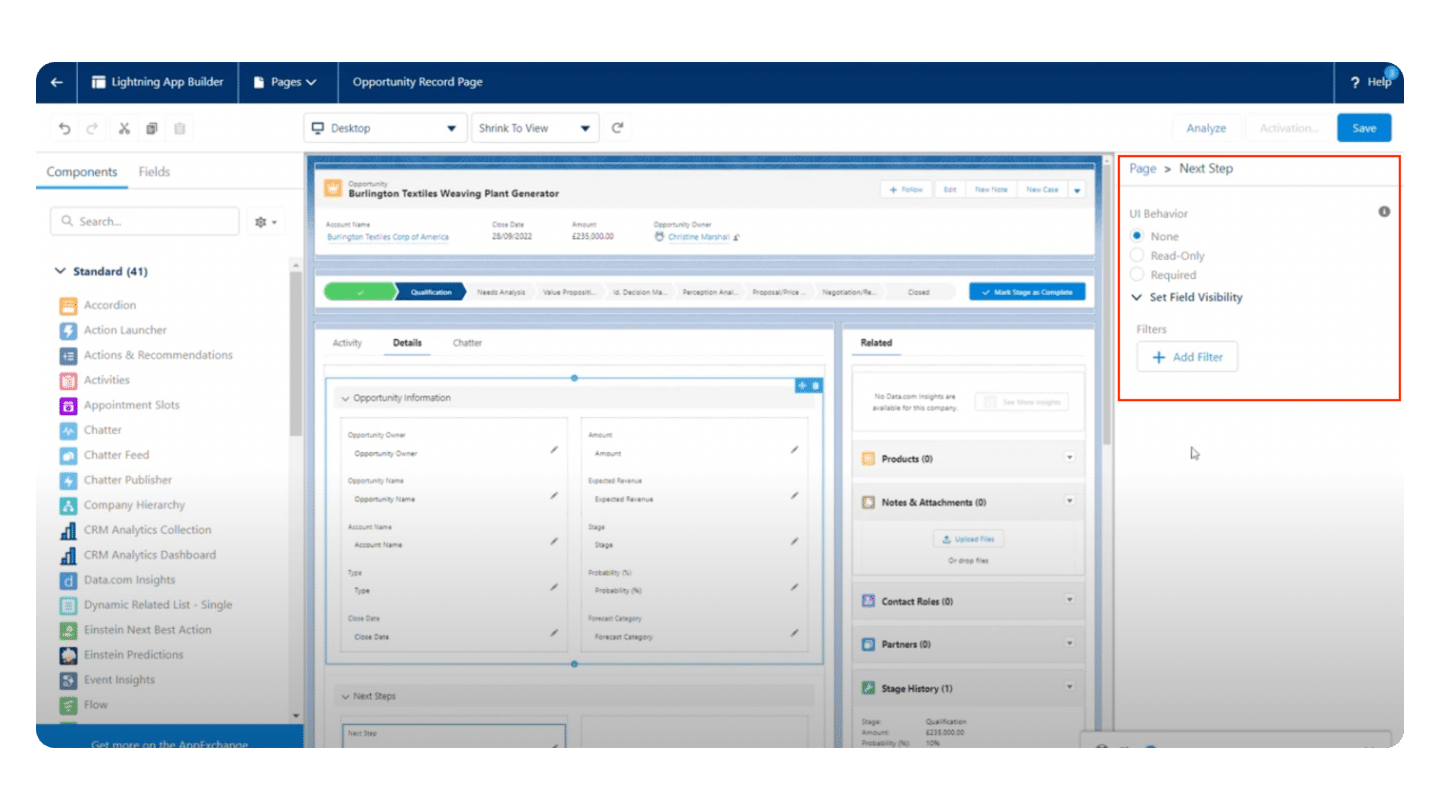
On top of that, Salesforce has introduced advanced features such as Dynamic Forms, which are revolutionizing access rights management. This technology lets you make a specific field editable or visible only to certain users, based on precise criteria. Unlike older methods, which often required duplicating pages and profiles, Dynamic Forms considerably simplify customizing user interfaces according to access rights.
4. Make the transition (the cutover) from your old CRM to Salesforce a success
People used to IT projects know the term “cutover” well, often associated with a critical and risky moment in a project. But what exactly does it involve?
The “cutover” is the process of transitioning from the old CRM, let’s say CRM A, to a new system, here Salesforce. This step is important because it aims to transfer not only the data, but also the business processes and user interfaces, to an environment that is often radically different. Migrating a CRM goes far beyond the purely technical side of data migration.
The goal is to make this organizational transition as smooth and seamless as possible for users.
However, transferring data and configurations from one system to another is a complex operation that takes time. This transition time, although minimized by prior simulations called “dry runs”, cannot be reduced to zero. These simulations are essential because they make it possible to identify and fix problems before the actual cutover day, thus reducing the risk of service interruption.
What’s more, a successful cutover doesn’t rest on technology alone. User training and communication are just as crucial. Before, during and after the cutover, it is important to offer users appropriate support to familiarize them with the new system. Training sessions and clear communication materials can greatly ease this adaptation.
Finally, it is important to plan a post-cutover monitoring period. During this phase, the IT team must remain vigilant and responsive to user feedback in order to quickly fix any technical or functional issues that may arise. This monitoring helps stabilize the system and ensure that the new CRM really meets users’ needs.
5. Plan ahead for the maintenance of your Salesforce CRM (third-party application maintenance)
Over the life of your CRM, you will go through periods of change, often punctuated by specific projects. However, between these active phases, it is essential to keep the system running properly and to quickly fix any malfunction. That is where third-party application maintenance (TMA, as it is called in France) comes in.
What is TMA?
TMA refers to the ongoing maintenance services that keep your CRM running properly day to day, by fixing bugs and making minor improvements to the system. This maintenance is important for the stability and continued efficiency of your operations.
To handle this ongoing maintenance, it is often wise to sign a maintenance contract with a specialized provider. At Cloud Girafe, for example, we offer TMA services recognized for their efficiency and adaptability. Our agile approach is particularly appreciated, so much so that many competing and partner integrators don’t hesitate to recommend us to take over the post-project maintenance of their clients.
We advise you to anticipate this topic and to negotiate the terms and pricing of the TMA with your Salesforce integrator from the start. This not only lets you anticipate costs, but also ensures your system will be in good hands after the initial deployment phase. By setting these terms from the outset, you can focus fully on your core business, with the assurance that your CRM runs optimally and keeps adapting to your needs.
Conclusion
In conclusion, it is worth stressing one last time how important it is to approach a CRM migration first and foremost as an organizational matter. Beyond the technical side, beyond the question of data (to which migration projects are sometimes reduced), the success of a migration to Salesforce depends on your ability to make this new CRM a tool that users adopt and endorse, aligned with their business needs. That is the key to a successful “cutover” to Salesforce, and it is the principle that guides the projects I carry out with my clients at Cloud Girafe. If you have any questions on this topic, feel free to leave a comment.