That shows up in LGM’s pricing, far higher than most of its competitors. La Growth Machine’s entry plan is 60 € per month, against 39 € for Lemlist. Above all: some key features, such as being able to customize your multichannel sequences, are only reachable in the Ultimate version at 180 € per month per user.
LGM is clearly not within every company’s reach, and that is a shame, because the tool is genuinely top-shelf.
La Growth Machine’s key features
An all-in-one prospecting tool
La Growth Machine is genuinely a multichannel prospecting tool, in the sense that it lets you drive every B2B prospecting channel from one place:
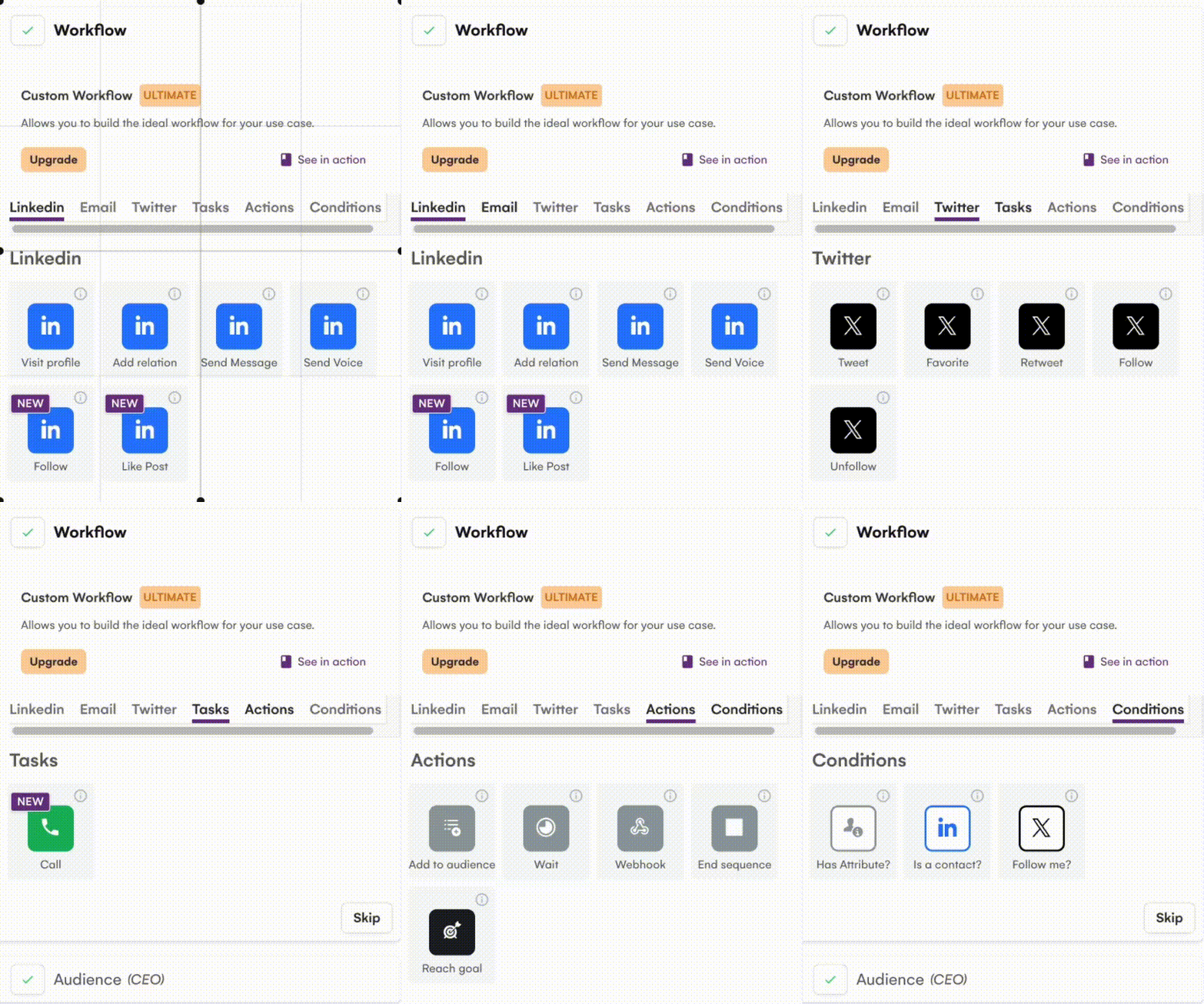
- LinkedIn. La Growth Machine invites you from the start to sync your LinkedIn account, which then lets you import leads from it, build campaigns that include it and handle your LinkedIn conversations from La Growth Machine.
- Email. Here too you are invited from the start to sync your work email account, which will be used in the prospecting scenarios you build with La Growth Machine (no alias possible). Syncing your email also lets you handle your work mail straight from La Growth Machine.
- Phone. One of LGM’s strong points is being able to fold the phone into your multichannel prospecting sequences, something Lemlist also allows, but Waalaxy does not.
- X (formerly Twitter). You can import lists of X accounts and schedule tweets, mentions and direct messages from LGM. It is a less obvious channel for B2B prospecting, but it clearly opens up opportunities, particularly in certain industries.
Each of these channels can be folded into custom workflows, as we will see shortly. And of course you can combine channels to build multichannel scenarios.
Lead and audience management
La Growth Machine is essentially a lead management tool (centralizing, enriching, tracking) combined with a tool for running outbound campaigns and scenarios.
Lead management is one of La Growth Machine’s strong points:
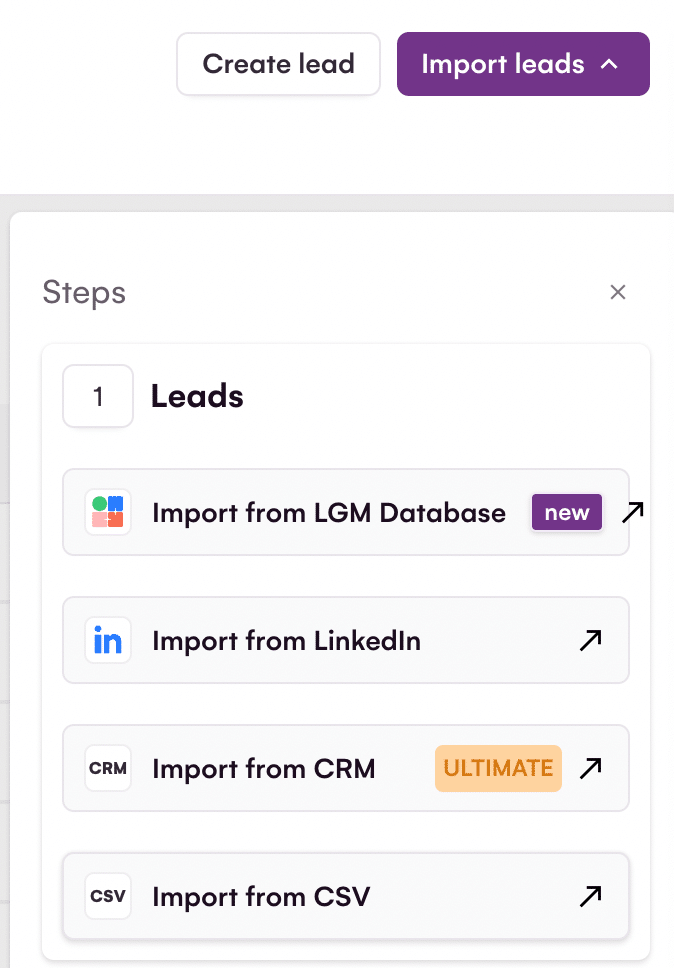
- From the interface you reach the list of every lead imported from your CRM, from csv prospecting files and from LinkedIn. You can use LGM’s database to spot new leads and add them to your list (see below).
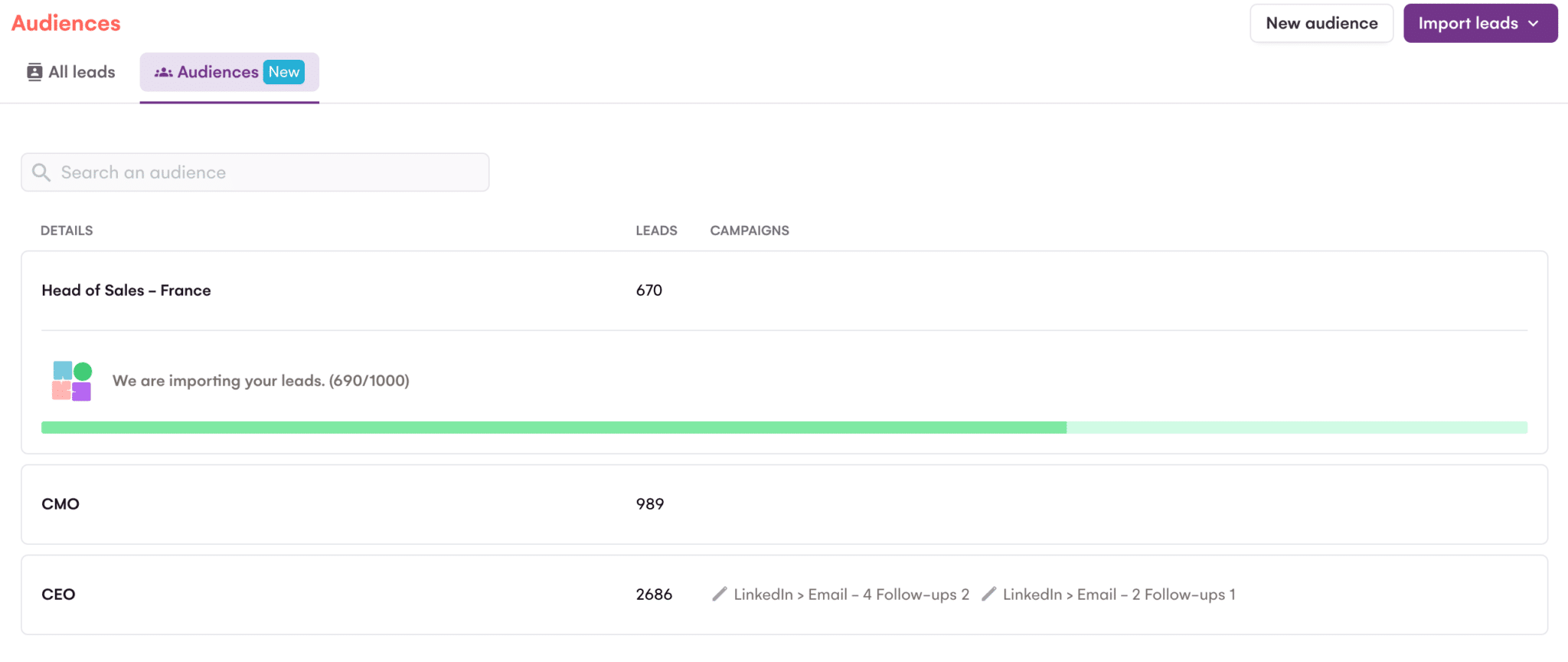
- You can organize your leads into segments, which LGM calls “audiences”. Those audiences then let you aim your prospecting scenarios precisely.
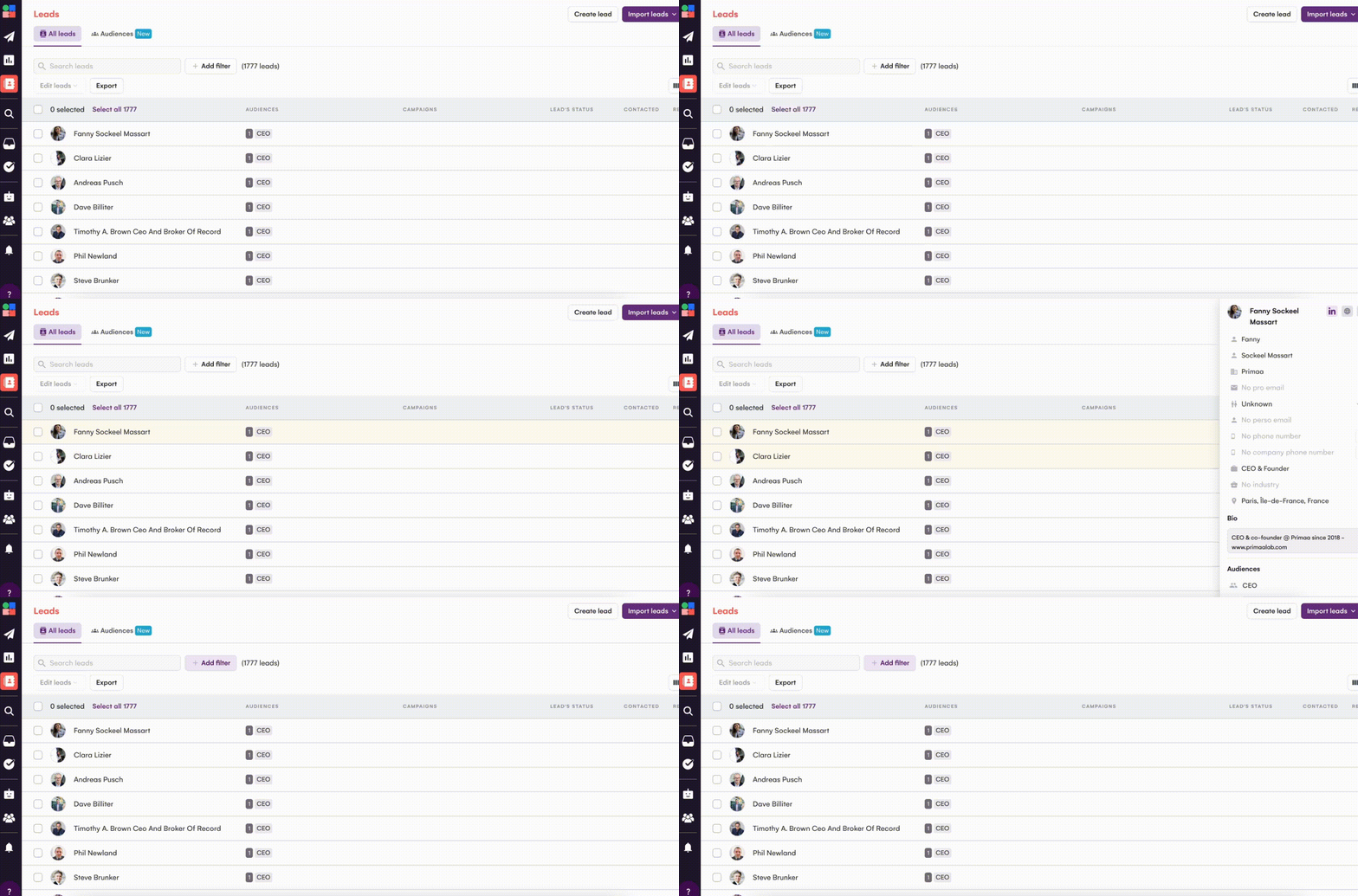
- Click a lead and you reach every piece of information available about the contact, much like a CRM record.
- From the lead list you can also see which campaigns each lead is in, and the lead’s status.
La Growth Machine’s lead management interface is both simple and highly functional. Here is what it looks like:
The “Audiences” tab lets you review all your audiences (segments). Click an audience and you land straight on the list of leads it holds. This audience manager is genuinely a plus for La Growth Machine.
The feature may look ordinary from the point of view of classic marketing tools, but it is often missing from B2B prospecting tools. There is nothing of the sort in Lemlist, for instance.
A database of several million prospects
As mentioned earlier, you have several ways to build your lead lists in La Growth Machine:
- Import your existing leads from your CRM or from csv files.
- Import leads from LinkedIn and Sales Navigator.
- Find prospects in La Growth Machine’s own database.
La Growth Machine does not disclose the size of its database, but one thing is certain: it is very thorough. It makes finding new prospects that match your ICP very straightforward.
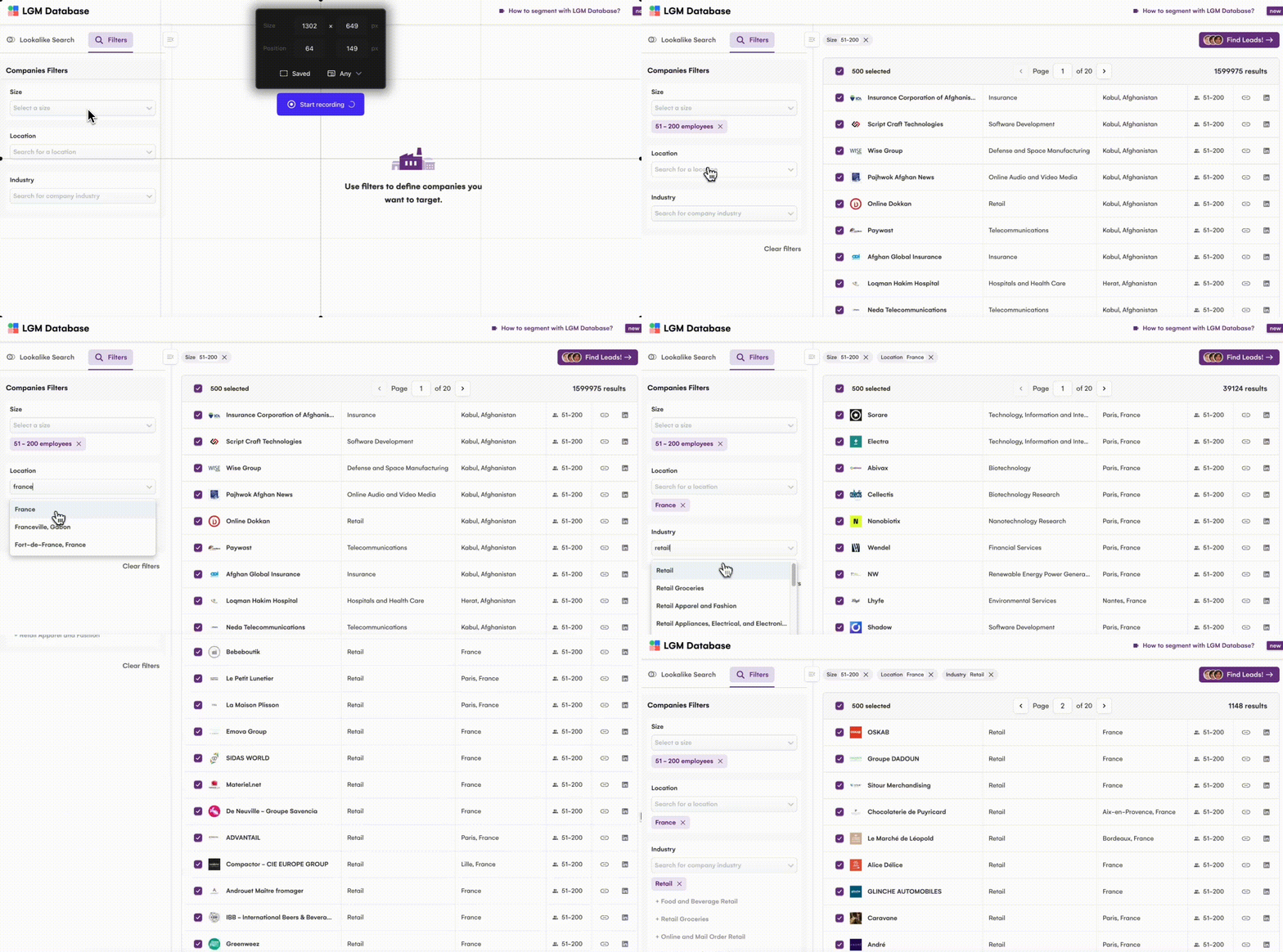
You state the company size you target (in headcount), the location and the industry, and LGM hands you the list of accounts matching all three criteria.
The next step is to click Find Leads to identify the people inside the selected accounts. You enter the job type (CEO, Head of Sales and so on) and LGM lists the people holding that role among the accounts from the first step. And of course you can then import those leads into your La Growth Machine lists by creating a new audience. Handy, and powerful.
Having prospects in a database is good; having everything you need to contact them and personalize your interactions is better. La Growth Machine’s database is natively enriched thanks to a partnership with Dropcontact, one of the best email finders on the market.
You can also enrich your prospects (from your CRM software, your own files or the La Growth Machine database) using the Sales Navigator connector.
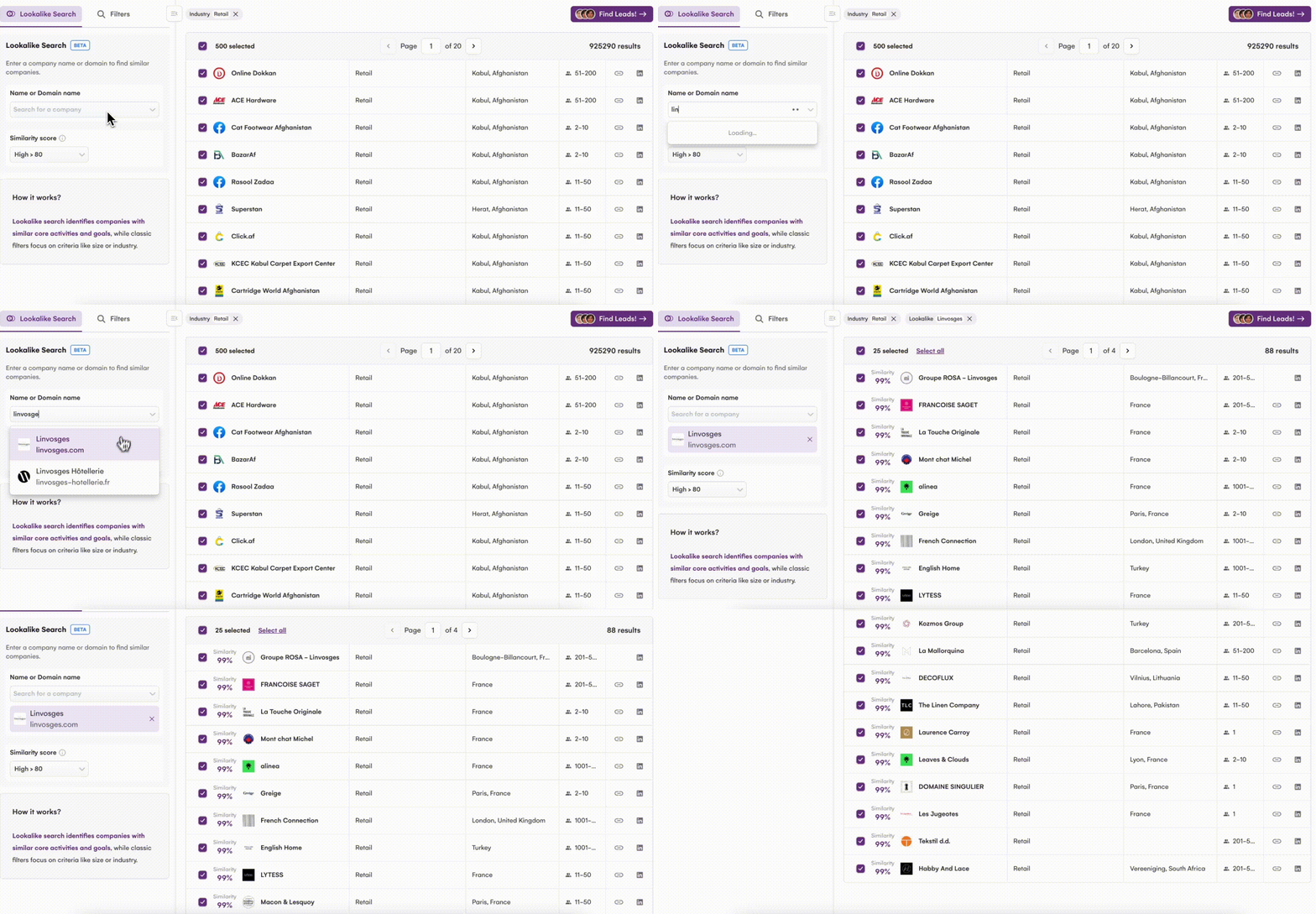
We were far less taken with the Lookalike feature, admittedly still in beta as these lines are written (late 2024) and available from the Pro plan, which aims to find prospects similar to a given one.
It is simple on paper: you enter a company name or a domain, and La Growth Machine offers a list of similar prospects. We tested it on around fifteen companies, and the results are rarely convincing. Above all, there is no way to filter by geography. A shame.
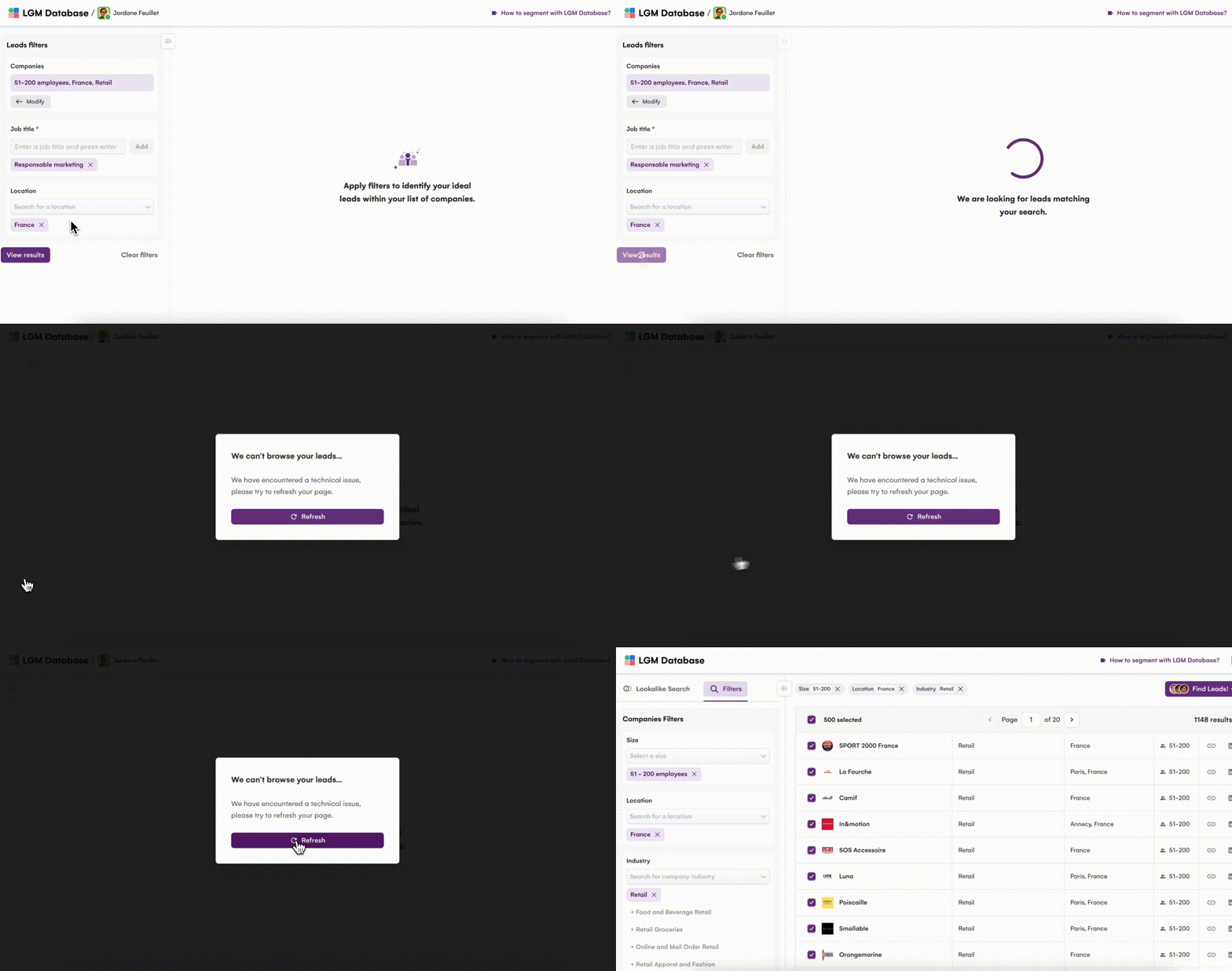
Another reservation of the same kind: on our side, we did not manage to generate a lead list from the LGM database.
Multichannel prospecting scenarios
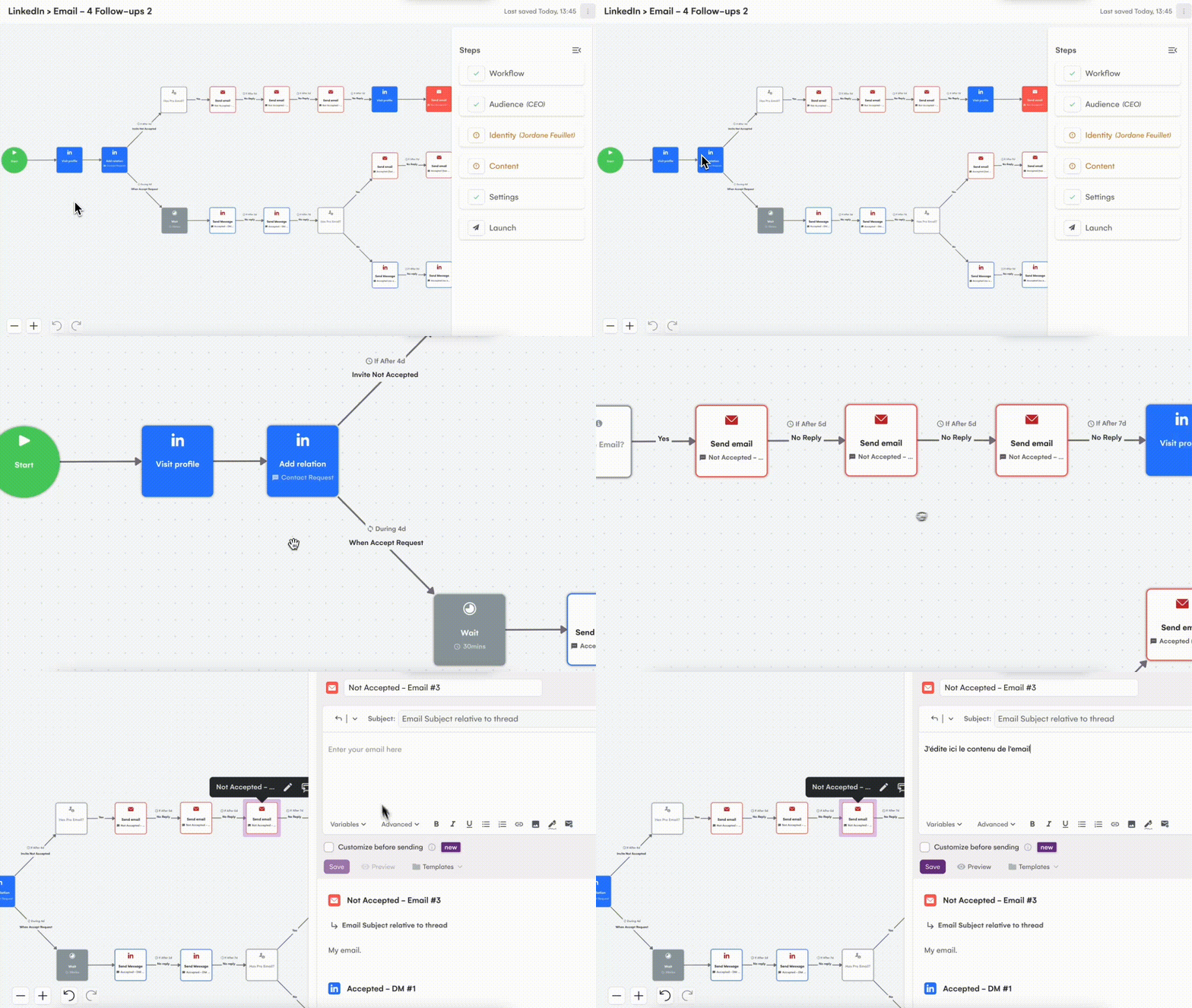
Once you have your lead lists and your audiences, you can move on to the next step: building campaigns and multichannel prospecting scenarios. La Growth Machine’s workflow editor has both a great strength and a serious drawback.
The strength first. The editor is both powerful and intuitive. It works simply:
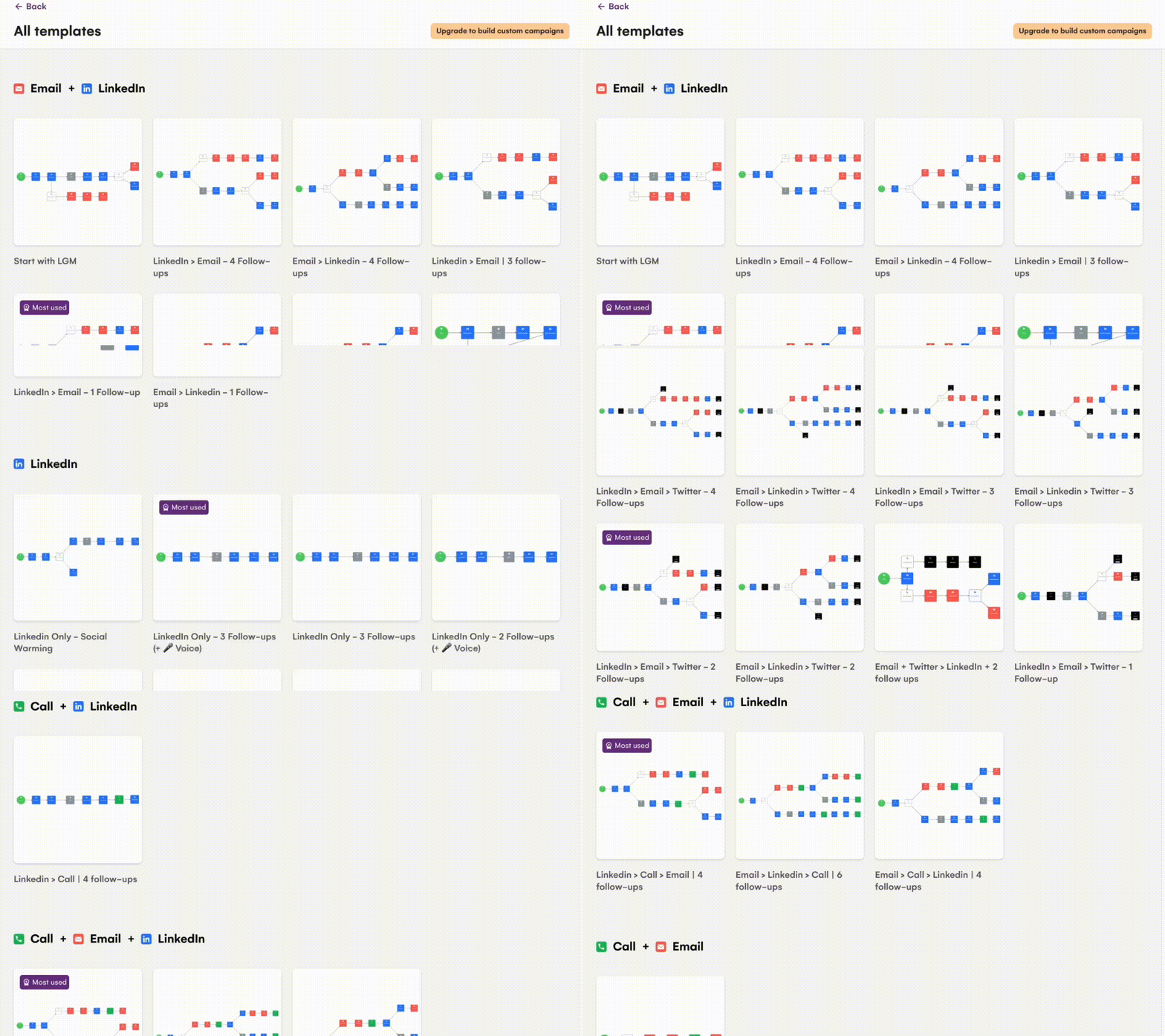
- You pick an off-the-shelf template (there is an impressive number of them) or you choose to build a custom one.
- You customize the sequence of messages and actions (sending an email, a LinkedIn message, and so on) and the trigger for the scenario (a prospect visiting your LinkedIn profile, for example).
- You pick the audience for the scenario.
- You write the content of the various messages that make up the scenario.
Everything is well thought out, and the editor holds a few good surprises, in particular the ability to fold LinkedIn voice messages into your sequences.
The big black mark, though, is that customizing your sequences is only possible from La Growth Machine’s Ultimate plan at 180 euros per month. On the Basic and Pro plans, you have no choice but to use one of the (admittedly numerous) off-the-shelf templates LGM offers. That is genuinely very limiting.
By comparison, on Lemlist you can customize your sequences from the basic plan (you are, on the other hand, limited to the email channel, with a capped number of emails per month). With LGM you get every prospecting channel from the Basic plan onward, but with no way to customize the sequences.
All the more of a shame given how well built the editor really is. Price is genuinely La Growth Machine’s big drawback.
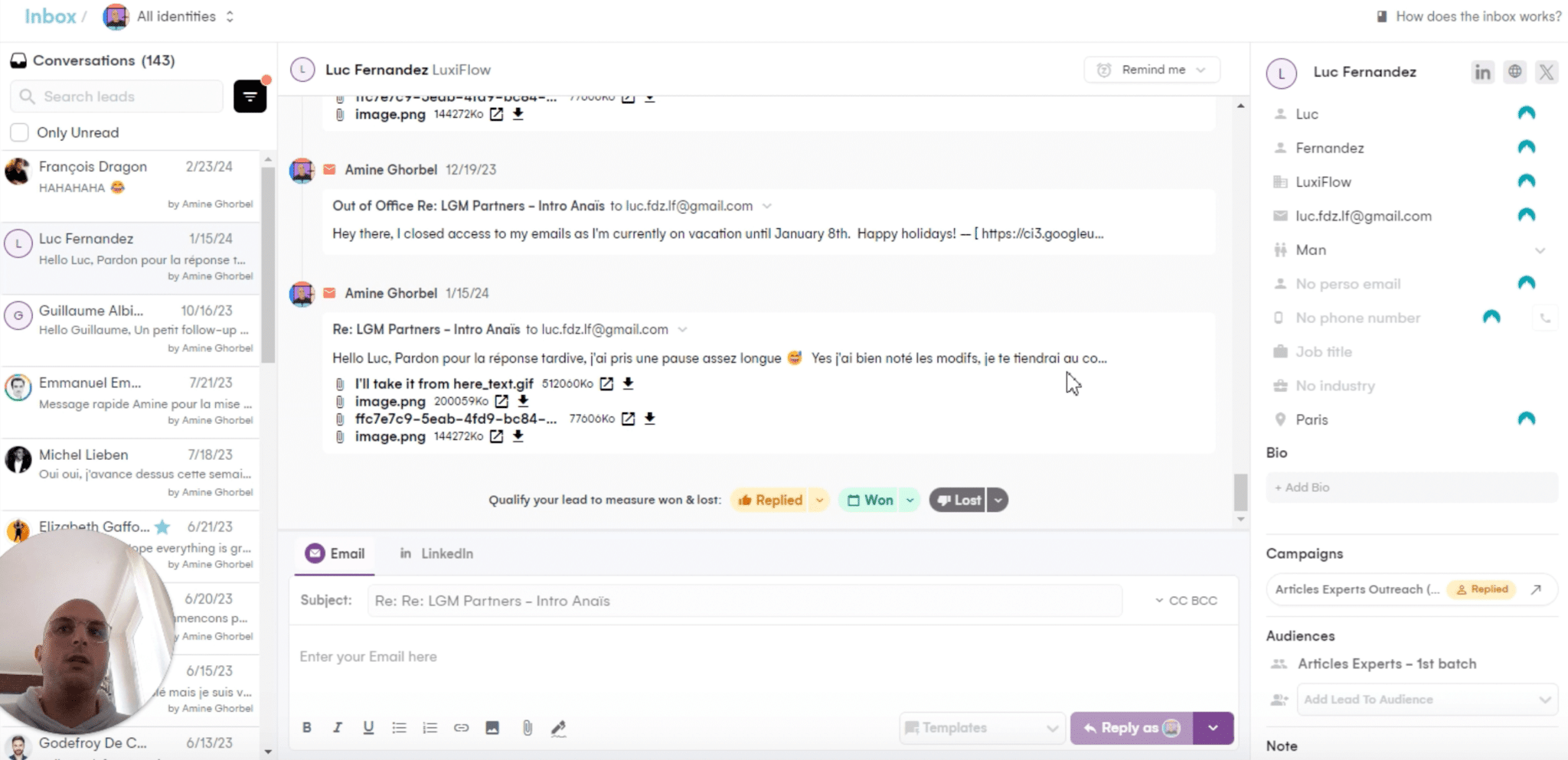
Those sequences generate prospect interactions (that is the point, at least) which you can handle from the La Growth Machine inbox (we did not test this feature, the screenshot comes from an LGM video, and it gives a good sense of how it works):
Reporting
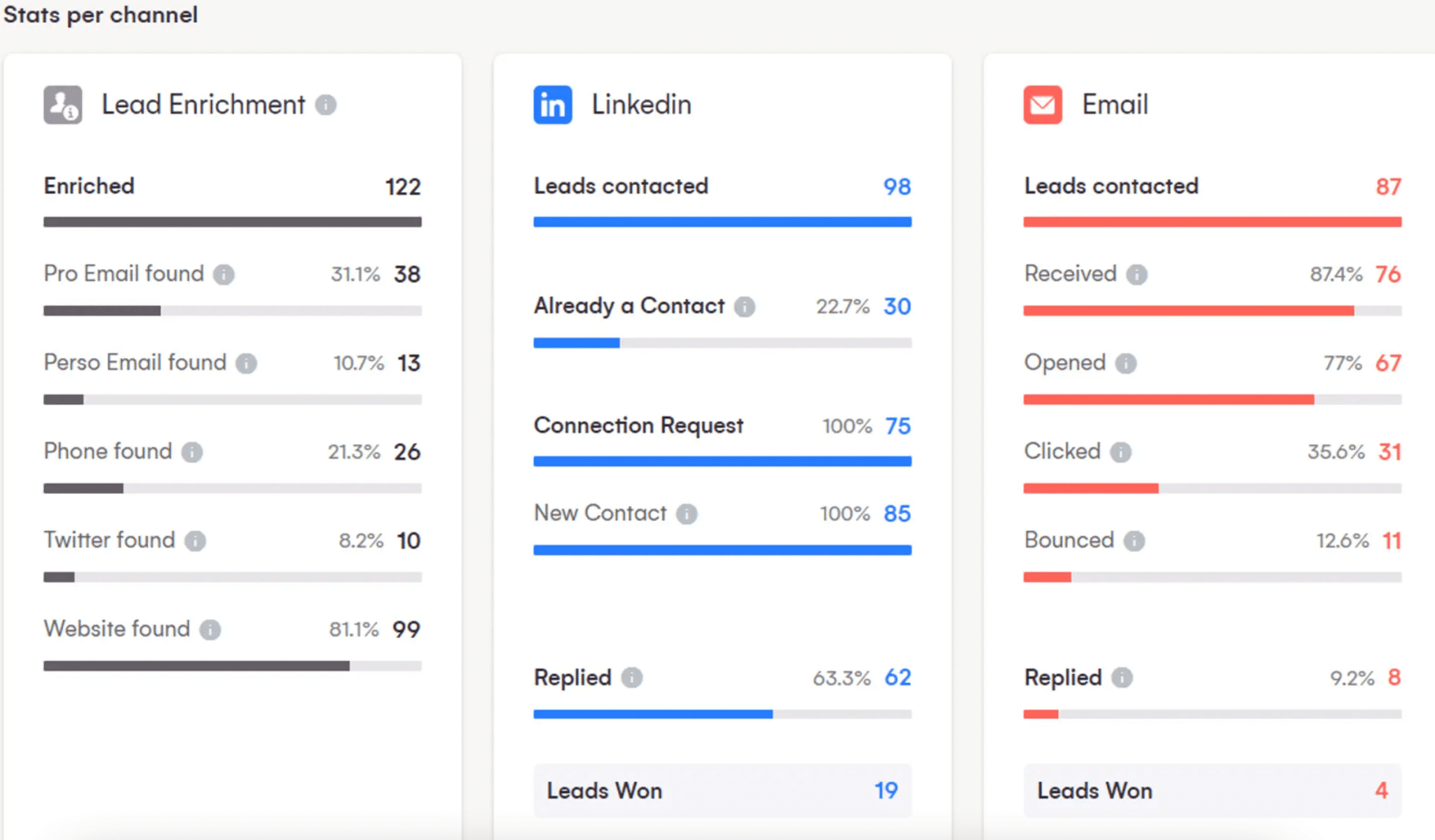
You only improve what you measure. Any prospecting tool worth the name has to offer advanced reporting. On that front, La Growth Machine answers the call. The tool gives access to several sales reports to track and improve the performance of your multichannel sequences.
You can analyze your performance:
- By channel: number of leads contacted, number of messages sent, open rate, reply rate, conversion rate and so on.
- By campaign or sequence. You can even score the performance of each step of your sequence, which is particularly useful for spotting where your scenarios can improve.
- By team member (number of meetings booked, and so on).
Reports export as Excel or CSV, which lets you build your own visualizations in a third-party tool if you want to. Reporting features, for once, are fully available from the Basic plan.
Artificial intelligence (AI)
La Growth Machine grasped the point of artificial intelligence right away and ships several AI-boosted features.
To begin with, you can use AI straight inside LGM to write the text messages (email and LinkedIn) that make up your prospecting sequences. That is the “Magic Messages” feature. La Growth Machine uses the OpenAI API for it.
It can save time, even if you will have to go back over the generated text, as always. Nothing revolutionary so far, most prospecting tools now ship AI content generation.
More impressive, you can use AI to automate your LinkedIn voice messages. And on that one, it is fairly stunning. This short demo video is worth a look:
Beyond generating text & voice content, LGM also uses AI in its Lookalike module mentioned above and to detect prospects’ out-of-office replies (which lets it adjust the send timing automatically).
Is La Growth Machine easy to use?
Yes, La Growth Machine is a simple tool to use. The way you work with it is simple and well worn in:
- You build your lead lists and your audiences (segmentation).
- You can enrich your leads using the Dropcontact and/or Sales Navigator integration.
- You build your prospecting sequences.
- You handle prospect interactions from the centralized LGM inbox.
- You analyze your performance to keep improving the sequences you have running.
And of course you can sync La Growth Machine data (leads and interactions) into your CRM, as we will see in a moment.
It only takes a few hours to get comfortable with the tool’s main features.
Integrations
Integrations are one of La Growth Machine’s strong points. LGM offers one of the richest connector catalogs on the market.

LGM offers 4 CRM connectors: Pipedrive, HubSpot, Salesforce and, more unusually, Folk. An API is available if you happen to use another CRM.
Worth flagging too, the many connectors offered with data providers:
- SocieteInfo (the go-to B2B database for the French market)
- Pharow (in our top B2B data providers)
- Captain Data
- Sales Navigator
- Phantom Buster
- Trigify
- Buska
- Leadfeeder
- PersanaAI
- Huntool.
And that is not all, LGM also offers connectors with:
- Advertising: Meta, Google Ads, LinkedIn Ads.
- Cold calling: Airtable, Ringover, Calendly.
- Communication: Gmail, Outlook, Slack, LinkedIn, Hyperise.
- Personalization: Clay, Sendspark, Weezly.
Plus Zapier (which multiplies the ways you can wire it to your other tools), Airtable and Google Sheets (to enrich your XML prospecting files).
You will not find that breadth of integrations on the other B2B prospecting tools on the market.
La Growth Machine’s pricing
On to the sore subject. La Growth Machine offers three plans:

- The Basic plan, at 60 € per month per user. This plan allows up to 3 active campaigns per user, lets you import leads from LinkedIn and Sales Navigator, and gives access to every reporting feature and to La Growth Machine’s database.
- The Pro plan, at 120 € per month per user, which switches on 2 new prospecting channels: X and voice. This plan opens up LinkedIn behavioral data import, access to the LGM inbox (to handle email and LinkedIn interactions from LGM) and access to some integrations only (not Pipedrive, not HubSpot). You are capped at 6 active campaigns.
- The Ultimate plan, at 180 € per month per user. This plan gives access to every integration and lets you build custom sequences. You can create an unlimited number of workflows and campaigns.
Worth noting that:
- La Growth Machine offers a 14-day free trial, handy for testing the tool before committing (though every prospecting tool offers that).
- Agencies get a 20% discount.
- For companies with very advanced needs, LGM offers a custom plan, on quote.
La Growth Machine’s prices are very clearly above what competitors offer (Lemlist, and even more so Waalaxy).
All the more so since the Basic and Pro plans carry serious limitations that make the Ultimate plan unavoidable if you really want to get value out of the tool:
- On the Basic plan you get no integrations and you are capped at 3 active campaigns. You also cannot fold calls into your sequences, sequences you cannot customize at this stage, as noted.
- On the Pro plan you get some integrations (but not all) and every channel. It is the equivalent of Lemlist’s Multichannel plan, except that you still cannot customize your workflows. As we saw above, that is genuinely one of LGM’s big black marks. And you cannot import your leads from your CRM either.
The heavy limitations of the Pro plan are a real shame. Some essential features are only available on the Ultimate plan.
That is genuinely the only big black mark on a tool that is otherwise right at the top.