With Folk, you can forget the classic CRM software reserved for sales reps. Here, the goal is to offer a single tool for organising all your professional contacts, whatever your job. Sales reps of course, but also recruiters, partnership managers, event organisers and so on.
Folk’s promise: saving you time through efficient, centralised management of your contacts. The software bets on simplicity, with a collaborative spreadsheet-style interface. No more multiple Excel or Google Sheets files. With Folk, all your contacts sit in one place, updated and enriched automatically.
The tool also stands out through its emailing features. You can build personalised campaigns in a few clicks, without leaving the interface. Folk takes care of adding the right variables and scheduling the send at the right moment.
On paper, Folk has everything of the ideal CRM for freelancers and small teams looking to free themselves from the time-consuming work of entering and updating data. Its simple, visual approach is appealing.
But what is it really like in use? Does Folk deliver on its promises? Are its features enough to meet the needs of the job? That is what we set out to check. After several weeks of testing, here is our full review of this unusual CRM.
Folk CRM: a tour of the functional scope
Contact and company management
Contact management is the heart of Folk. For each one, you can fill in details such as: contact information, company, job title, decision-making role, status (active, inactive and so on), tags and custom fields.
A timeline displays the history of exchanges: emails, calls and tasks tied to the contact. Very handy for seeing the latest interactions at a glance.
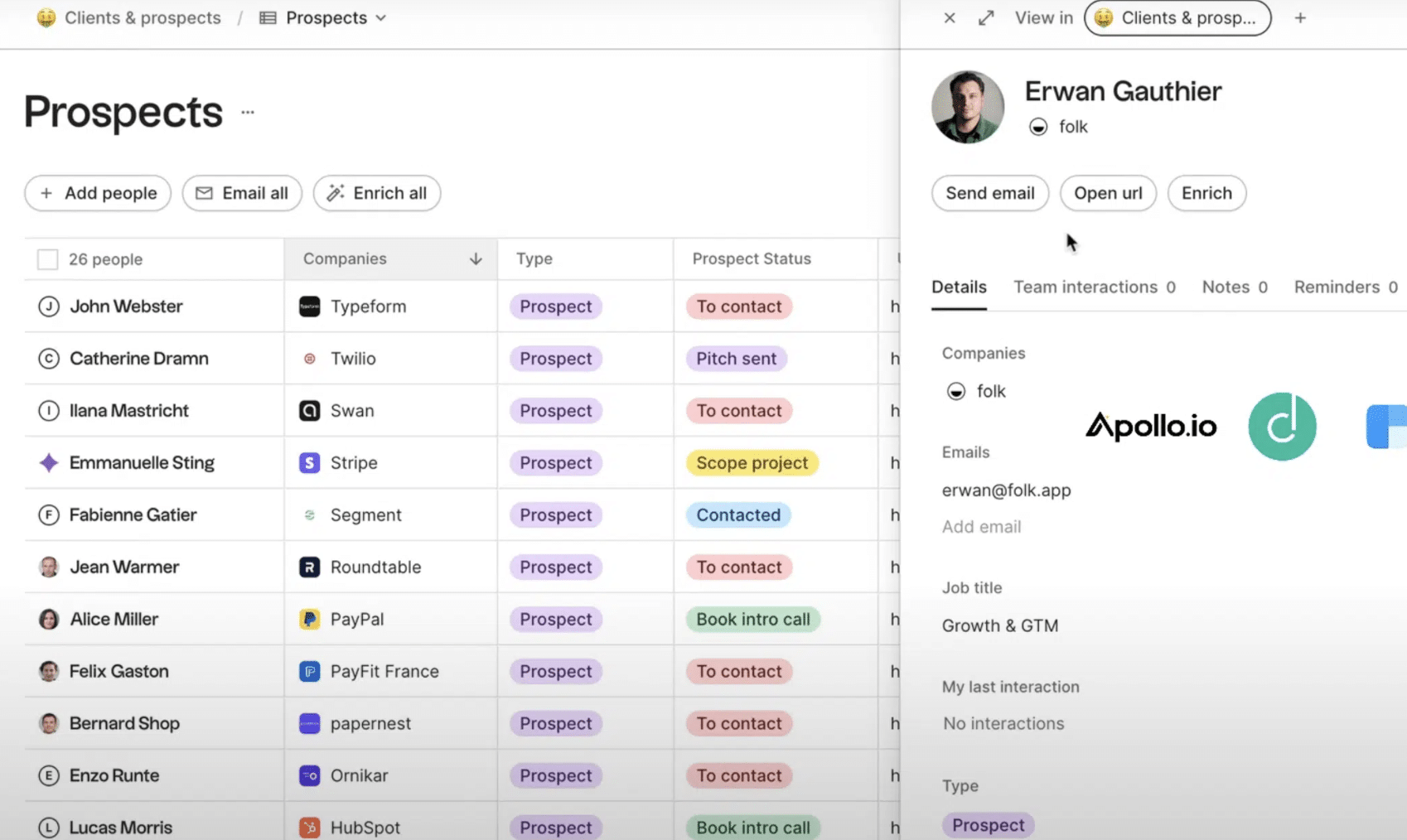
Contacts can be sorted into different “groups” to segment your database. For instance: customers, prospects, investors, candidates, alumni of an event, and so on. Each contact can belong to several groups. You are the one who picks the categories that make sense for your business.
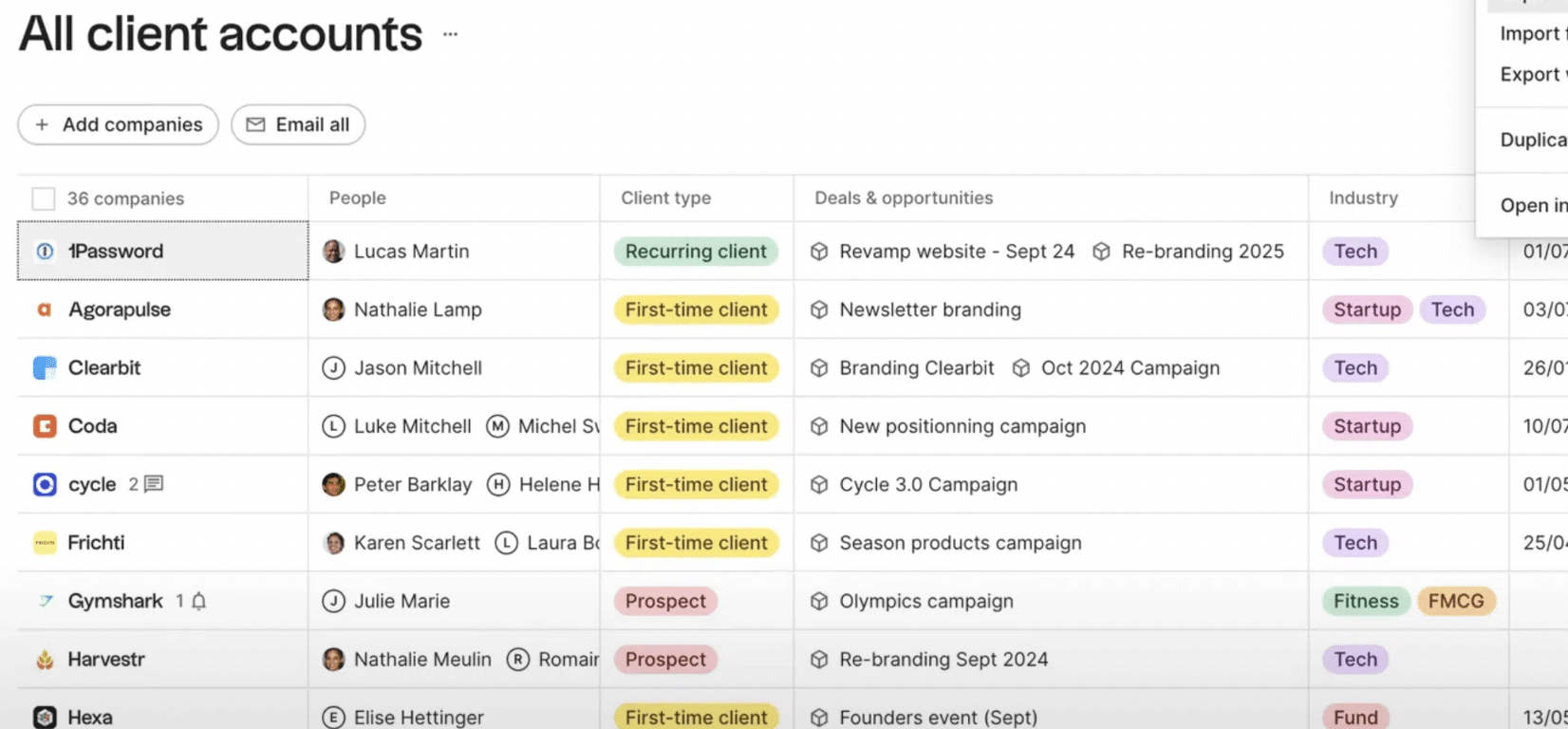
Folk also handles data at “company” level: industry, size, location, technologies used and so on. Here too, the fields are entirely customisable. And the tool takes care of tying each contact to the right company.
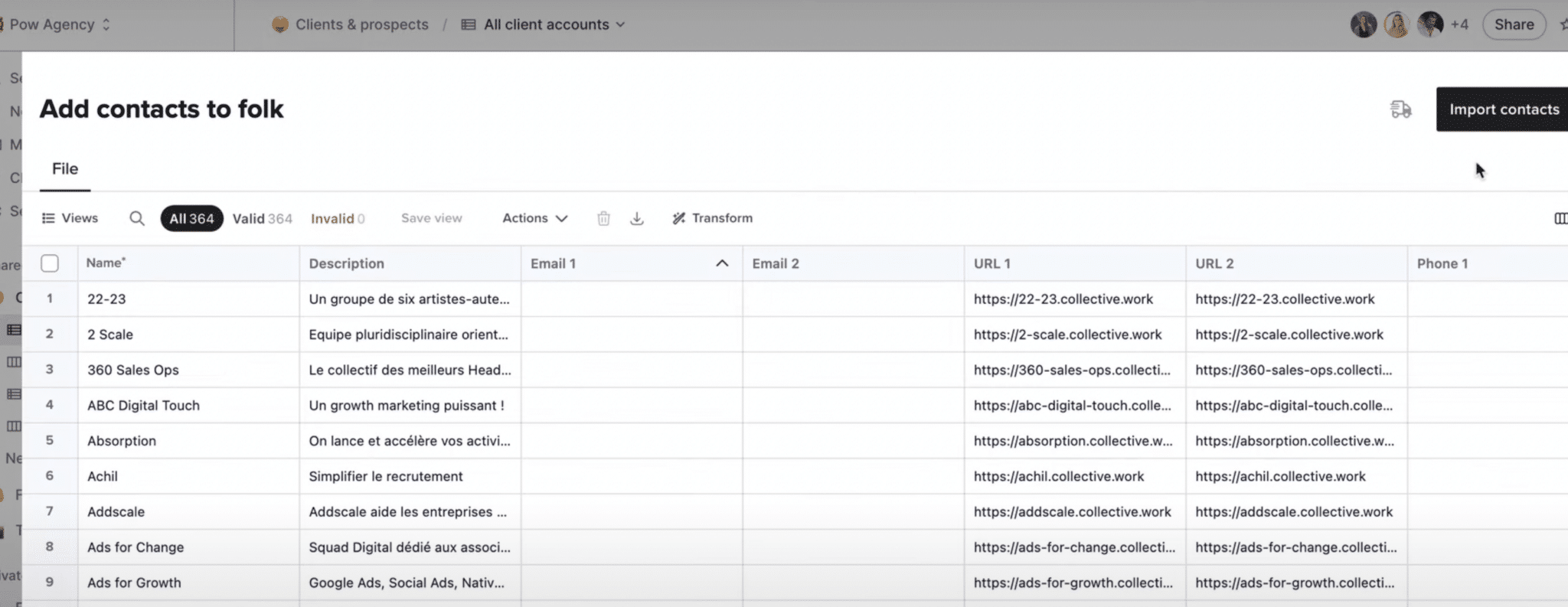
Importing contacts takes a few clicks, by syncing with your inbox (Google or Microsoft) or through a CSV file. Folk also spots potential duplicates with a matching system that works rather well.
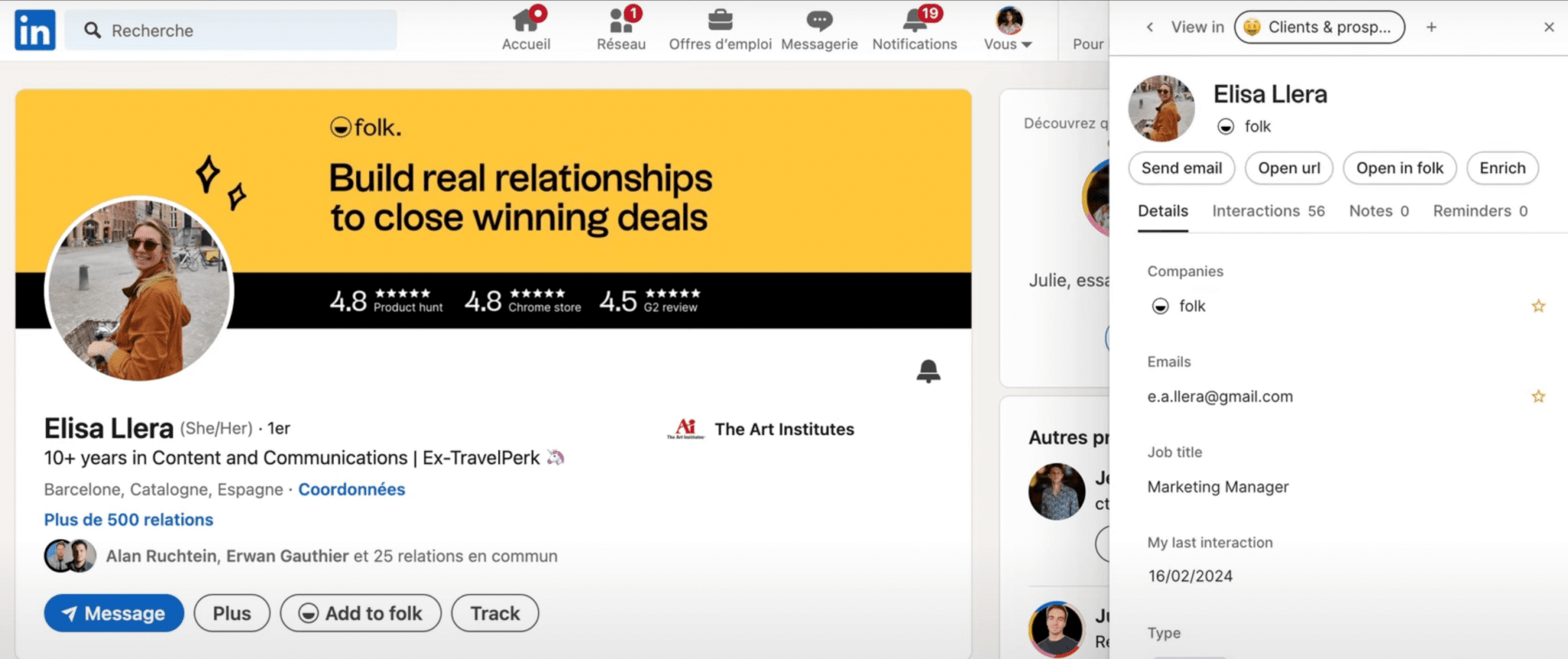
Finally, if you use LinkedIn for your prospecting, the Folk Chrome extension is very handy. It lets you import the details of a profile or a company page in one click. The data is pre-sorted into the right fields.
Automating email campaigns
Emailing is Folk’s other great strength. Fully integrated into the CRM, it lets you send personalised messages at scale without leaving the interface.
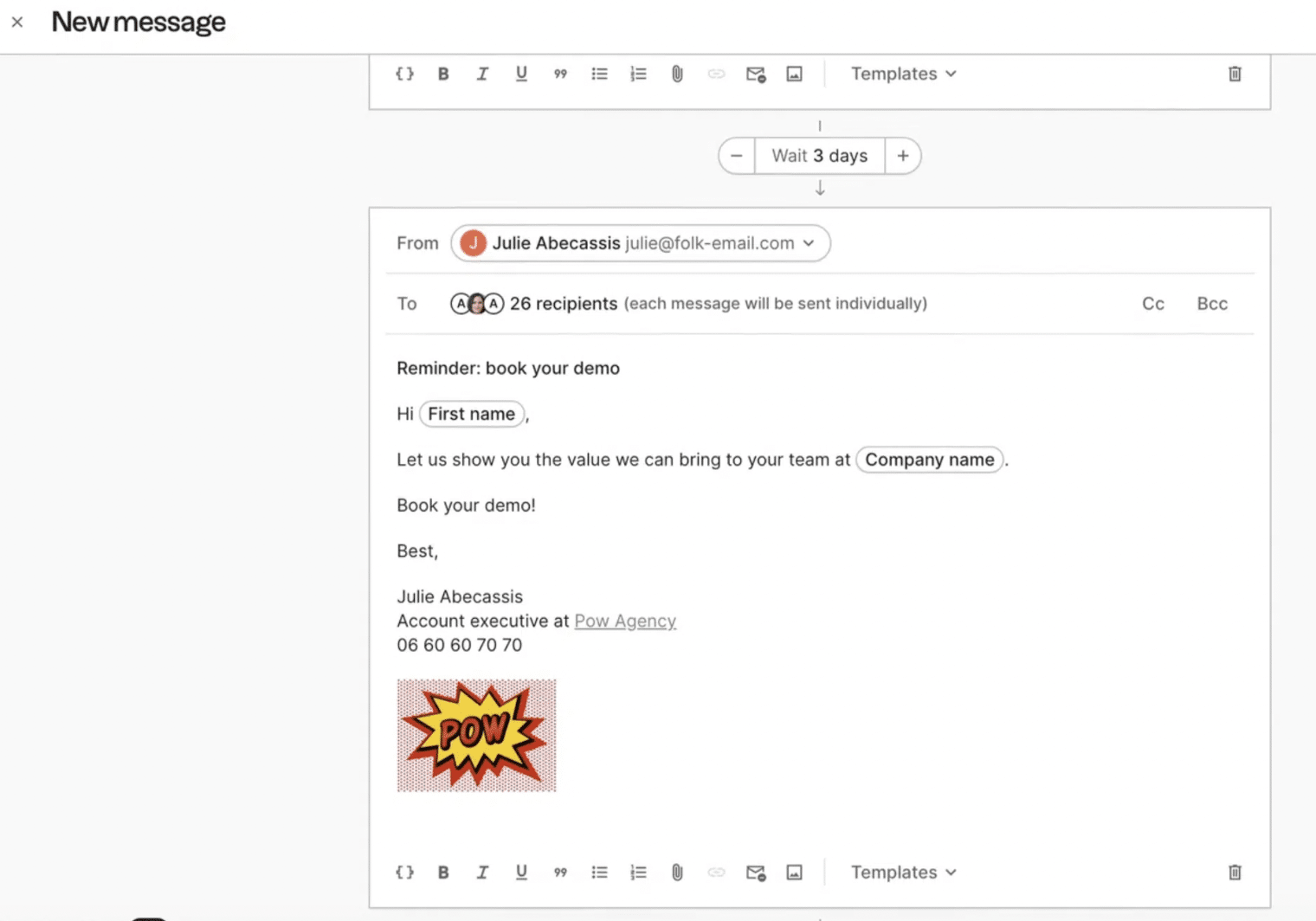
To build a campaign, you simply pick your audience from your contacts, choose an email template and personalise it with variables. First name, last name, company, job title and more: Folk offers dozens of dynamic fields to tailor the content to each recipient.
Reusable text “snippets” are also available: sign-offs, generic paragraphs and the like.
You can even use AI to generate whole passages (opening line, follow-up, thanks and so on).
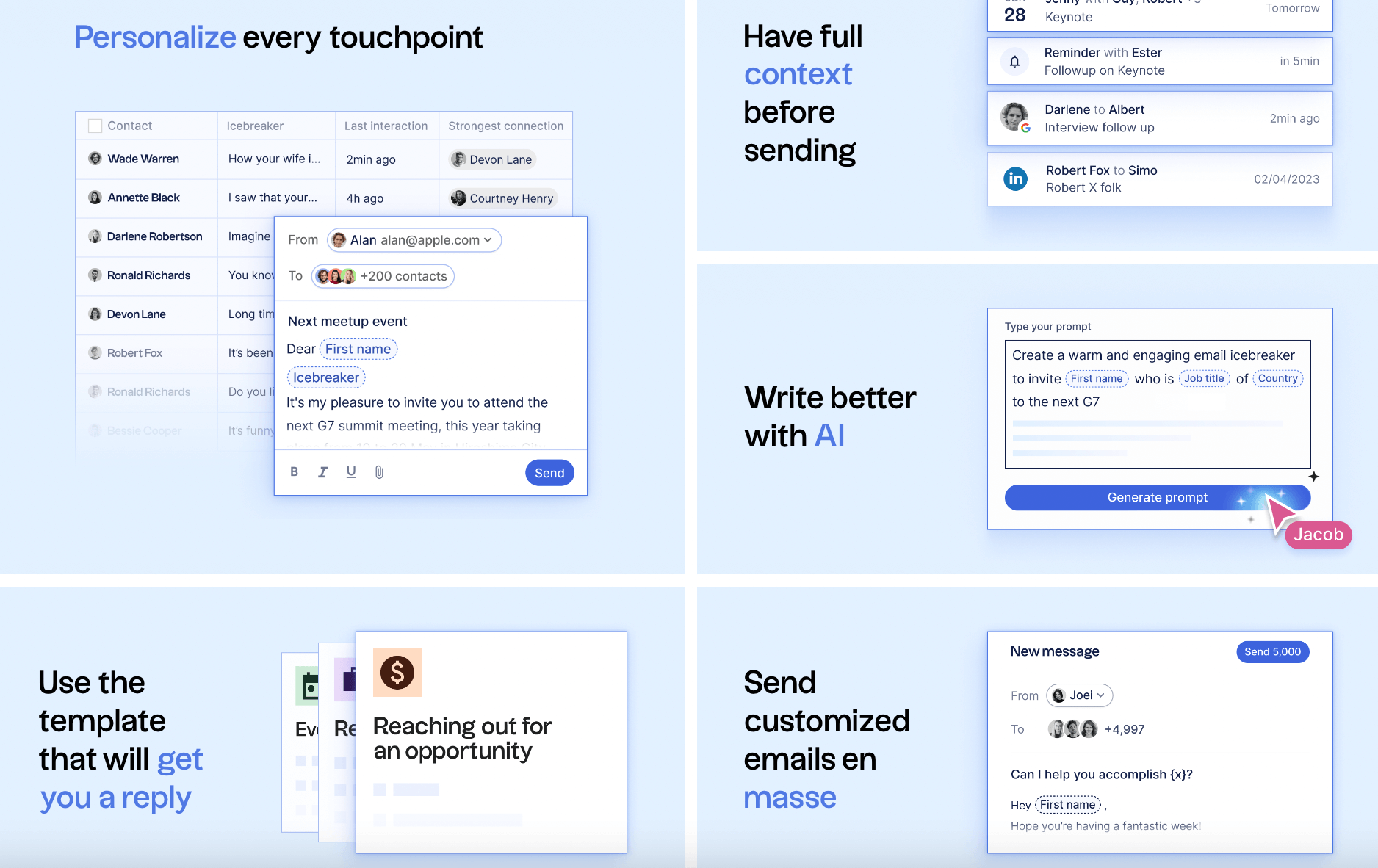
Once your email is ready, you simply schedule it to go out immediately or later, in one or several batches. Folk handles the rest, with rendering guaranteed across every mail client. Each campaign then gets detailed reporting: open rate, number of clicks, top content and so on.
The weak spot: no sequencing feature to chain several emails depending on how recipients react, or fail to react. You have to follow up by hand or set up delayed sends.
Tracking interactions and tasks
Folk is not a task management tool as such. But it includes the essential functions for keeping track of the actions and deadlines tied to your contacts.
For each contact or company, you can create a “task” to carry out on a given day at a given time: follow-up call, email reminder, demo call, and so on. Those tasks then show up in a dedicated tab and trigger a notification when the moment comes.
You can also add free-form “notes” to a contact record. Handy for writing down the summary of a call, a remark after a meeting, a briefing between teams and so on.
Finally, Folk centralises the history of email exchanges. In the contact view, you find every message sent and received, sorted chronologically. A good way to dig out a piece of information or see “who said what”.
Phone interactions and meetings, on the other hand, have to be entered manually, with no possible sync with a calendar or a VoIP tool. A potential area for improvement.
Integrations
Folk connects natively to your Google or Microsoft inboxes and calendars to sync your contacts, emails and meetings.
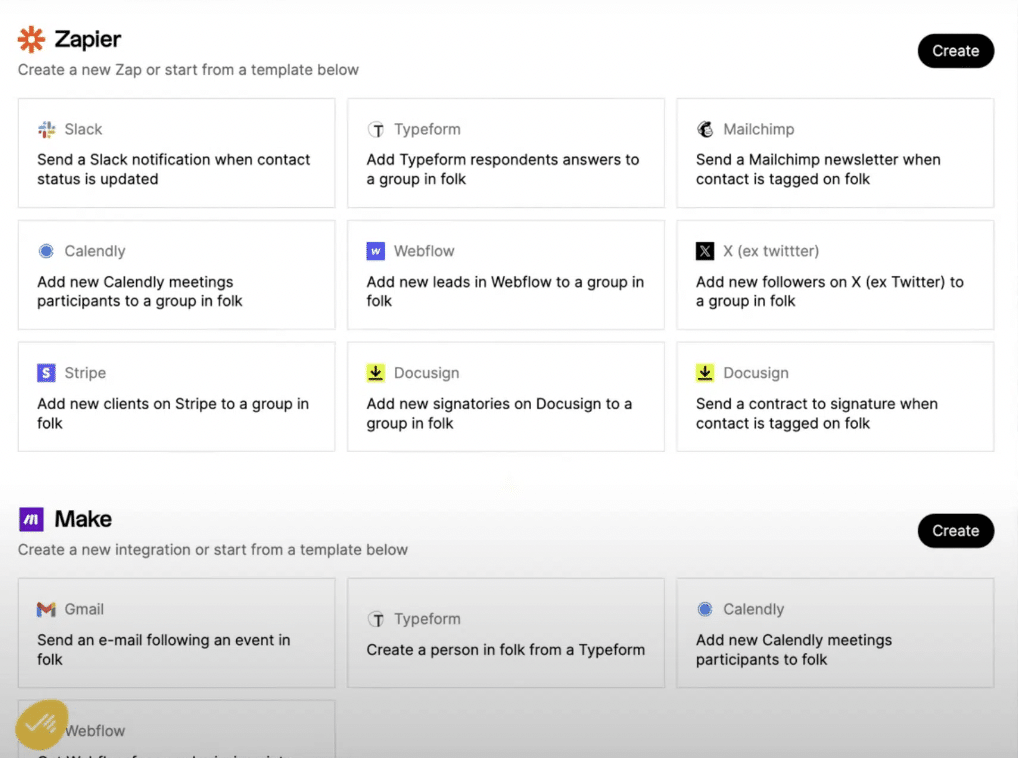
To go further, Folk leans on Zapier and Make (formerly Integromat). That lets you connect Folk to hundreds of third-party applications and automate the flow of data. The range of options is wide: syncing with your marketing automation tool, your customer support solution, your payment platform and more.
On the prospecting side, the Folk Chrome extension is your best ally. In one click you can add new contacts or companies to your database from LinkedIn, X or a prospect’s website. The data is categorised and enriched automatically.
Managing sales pipelines
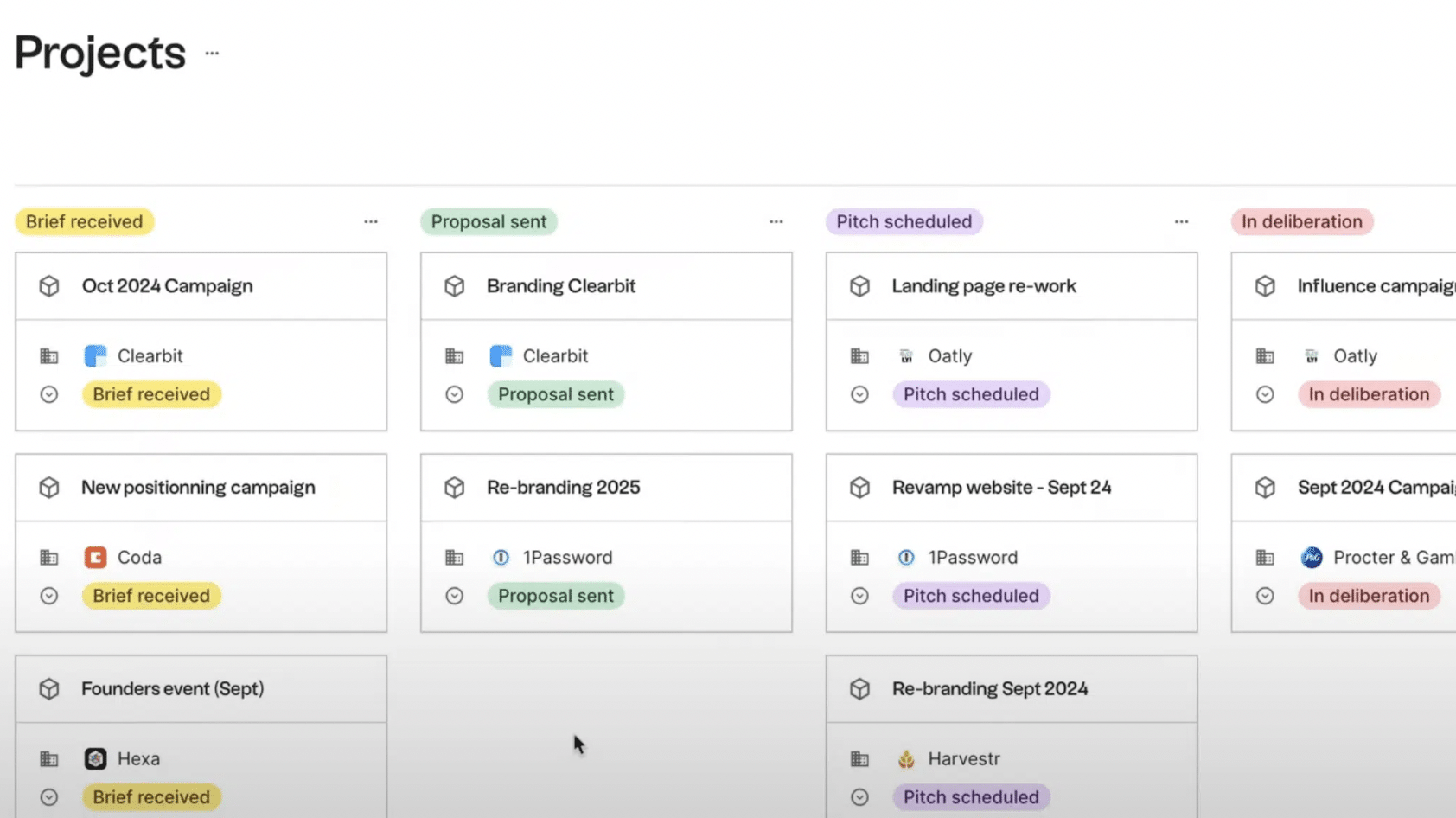
You can use Folk to track your deals and sales opportunities. You have the option of creating custom pipelines with the stages that match your sales cycle. Each deal takes the form of a card, which you move from one stage to the next as it progresses.
Folk was not designed as a sales CRM as such, however. There is no “deal” object separate from contacts and companies. Nor is it possible to have several pipelines for the same account. That can quickly become limiting if you have complex sales cycles with multiple stakeholders.
In the same way, amounts and closing probabilities are not taken into account in forecasts. Folk offers no sales reporting or forecasting to date. A gap for sales teams looking for a steering tool.
In short, Folk does the job for tracking a few deals visually and collaboratively. But it will not challenge traditional sales CRMs on that ground. It is up to you to decide what you are after!
Folk’s customer support: how good is it?
Customer support is one of Folk’s strong points. The vast majority of users highlight how responsive the team is and the quality of the help, right from the first exchanges.
The team listens and makes a point of answering each request precisely. The chat built into the tool gets you help almost instantly. During our test, we were talking to an advisor in under 5 minutes.
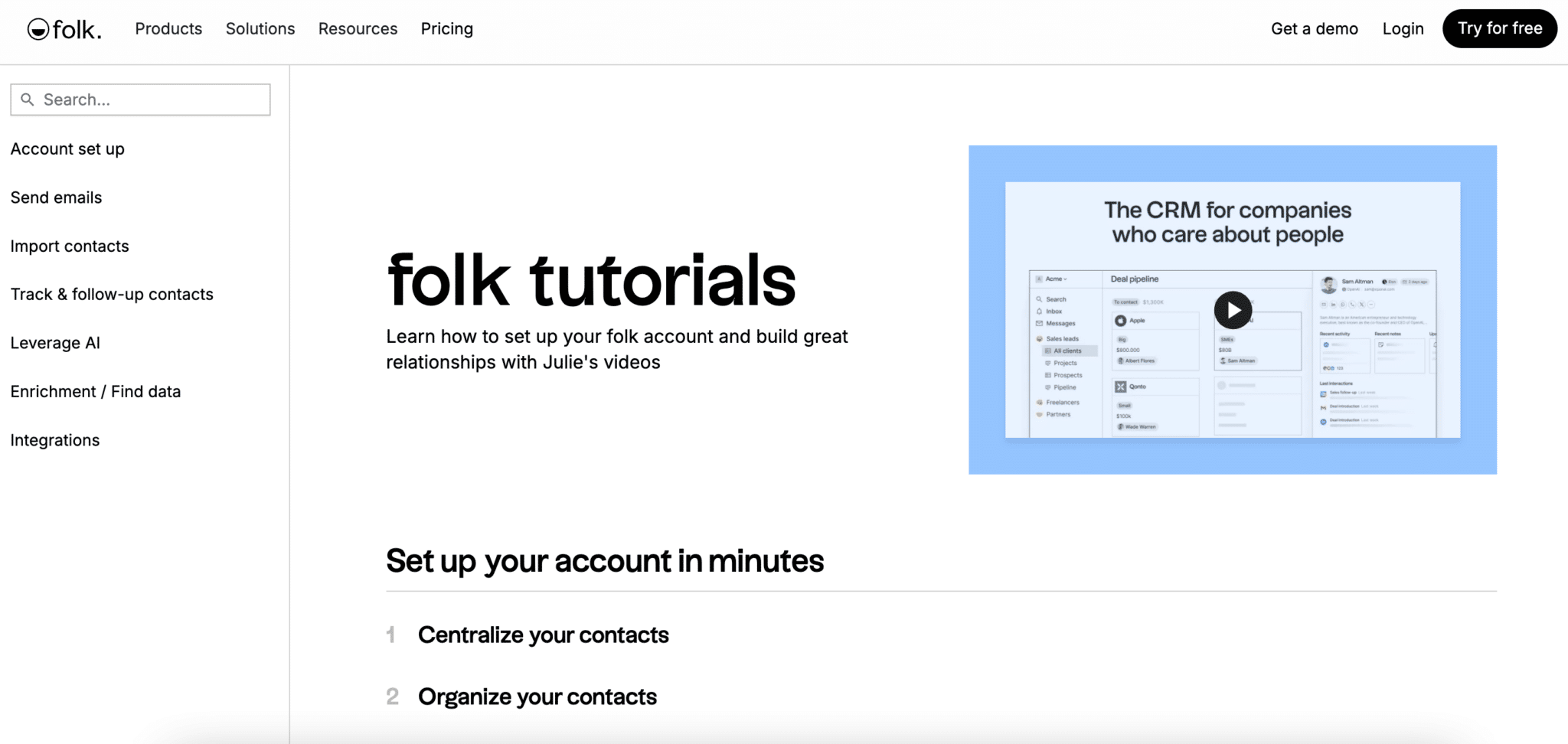
Folk also offers plenty of online resources to help you get started: articles, video tutorials, FAQ and so on. The Folk Academy is packed with advice and best practices to apply day to day. A good point.
Finally, you should be aware that the product is evolving at high speed. The team listens to user feedback and ships new features every week. Subscribers can even vote to prioritise upcoming development. A welcome transparency, one we would like to see more often.
The one reservation is that most of the content is in English. But support is available in French. The tool itself is fully translated.
What users say about Folk
Folk stirs a lot of enthusiasm among its users. On the main review platforms, the ratings are excellent.
Many compare Folk’s ergonomics and simplicity to those of Notion. In that, Folk is very close to another new-generation CRM software: Attio. Getting started is judged extremely quick, even with no technical knowledge. The tool is seen as an ideal alternative to spreadsheets patched up into a CRM.
Importing and automatically enriching contacts is very much appreciated, especially paired with the Chrome extension. Centralising the information is a real plus for day-to-day productivity. No more customer data scattered everywhere!
Customer support, for its part, is praised for its responsiveness and expertise. Several users name their go-to contact at Folk, which usually says it all.
Among the areas for improvement, some regret the lack of advanced features for sales pipelines and reporting. Others would like deeper customisation options or a dedicated mobile app.
But those gaps are quickly forgiven given how young the tool is and how full the roadmap looks. Many cannot wait to see what Folk has in store for them!
Value for money is judged very good, with real savings compared with heavyweights such as Salesforce or HubSpot. Some still find that prices climb quickly on the upper tiers.
In the end, Folk is unanimously praised for its simplicity and its flexibility. The tool appeals in particular to freelancers, creatives, recruitment professionals and startups in their launch phase. Its promise: making everyday CRM use accessible beyond sales reps alone. Promise kept!
Folk CRM pricing
Folk offers a simple, readable pricing grid, with 3 paid packages and no commitment:
- The Standard package starts at $25/month/user. It gives access to all the core features: contact management, custom pipelines, email integration, and so on. The number of contacts and emails is capped.
- A Plus version at $50/month/user removes those limits and adds advanced options such as magic fields (AI) and email sequences.
- Finally, the Custom package ($100/month/user) unlocks unlimited volumes and gives you VIP support with a dedicated account manager.
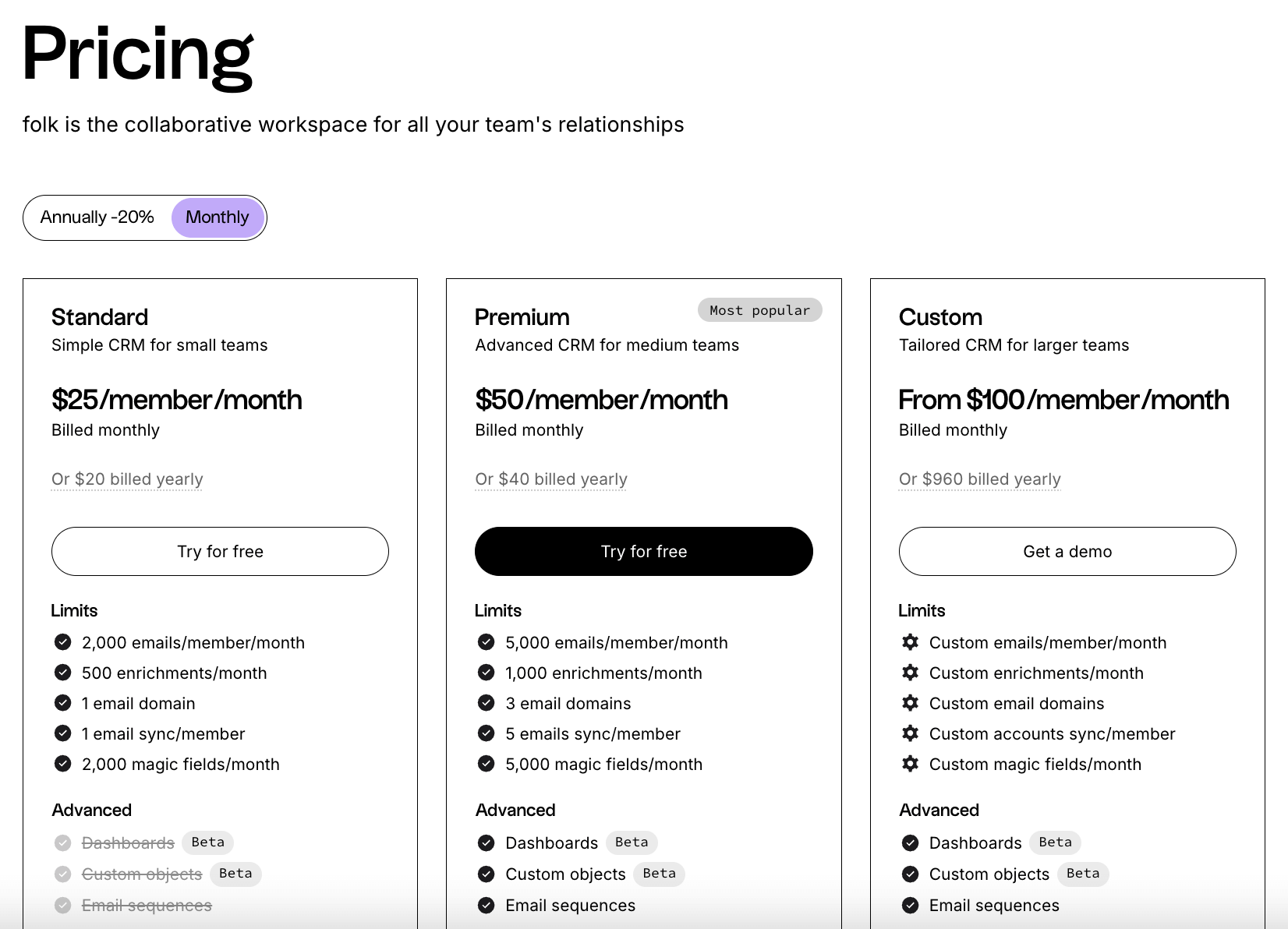
Prices are displayed clearly, with no nasty surprises. No hidden implementation or training costs. You only pay for what you actually need, based on your usage.
Billing is monthly or annual, as you prefer. The only difference: the annual package gives 2 months free. It is up to you to see which suits you best!