So no, clearly, this is not a free Salesforce. It is something else, excellent for some teams and completely unusable for others. What remains is working out which side you are on, and checking whether free self-hosting will really save you anything.
We opened a workspace, created objects, built workflows and assembled dashboards.
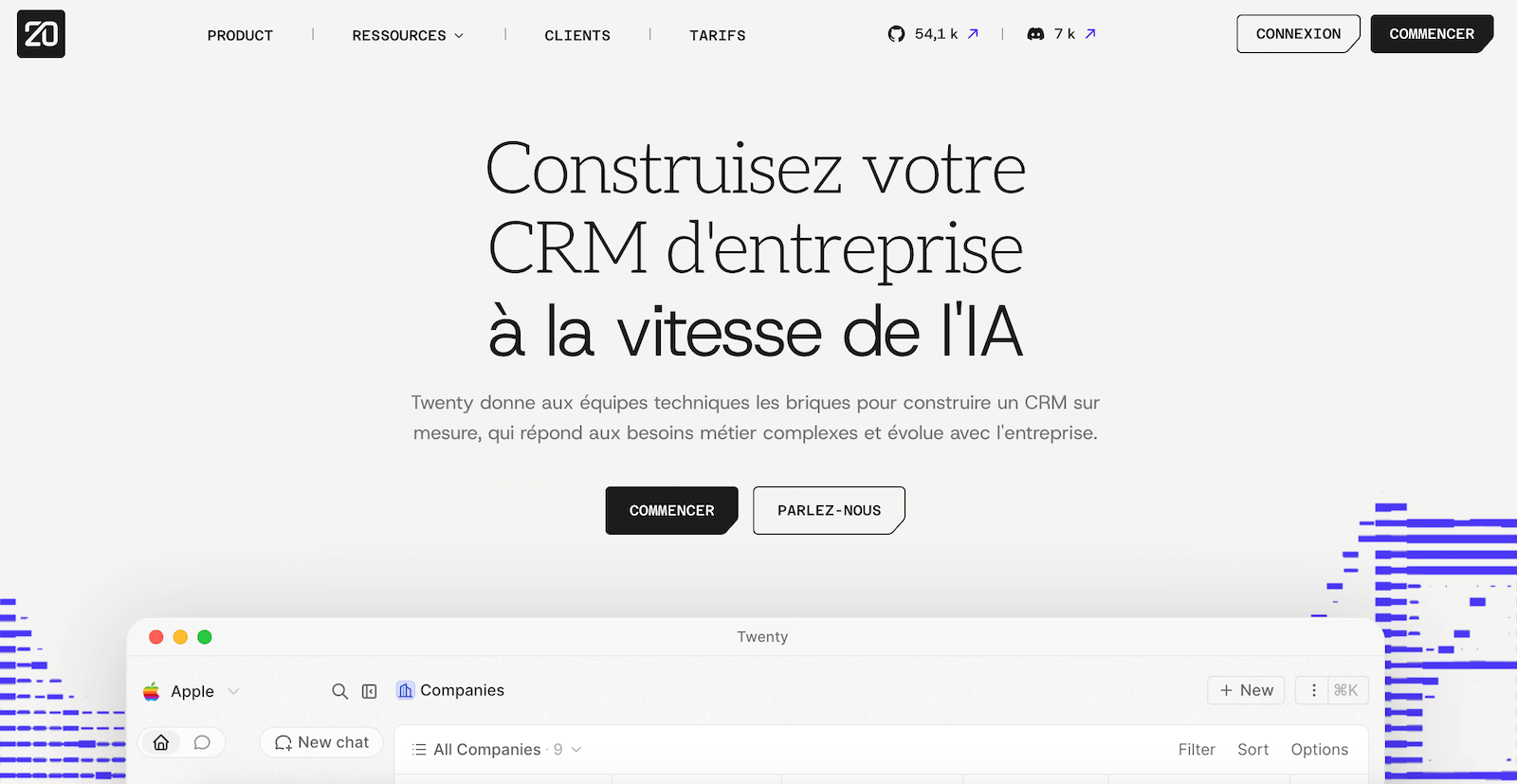
What exactly is Twenty ?
Twenty is an open-source CRM launched in 2023 by a Paris start-up, founded by Félix Malfait, Charles Bochet and Thomas Colas des Francs, and a Y Combinator alumnus. The project now claims more than 54,000 stars on GitHub, which makes it the most followed open-source CRM in the world, with a community of 7,000 people on Discord.
The detail that matters most, though, is written on its own home page: Twenty does not present itself there as an alternative to Salesforce, but as a set of building blocks aimed at technical teams to build a bespoke CRM. The vendor has reached the same conclusion we did: its product is not to be judged on feature parity with the incumbent CRMs.
Two ways to use it:
- The managed cloud, billed per user, where Twenty handles the infrastructure, the backups and the version upgrades.
- Self-hosting, whose licence is free, where you install the complete product on your own server and take on running it.
Version 2.0, released on 21 April 2026, changed the nature of the product by opening an application platform. We come back to it below.
Why comparing it with Salesforce sends you down the wrong path
Twenty keeps the ambiguity alive itself. Its pricing page shows a fake comparison titled “Salesfarce Pro”, where every normal feature turns into a chargeable extra. It is funny and well aimed. Above all, it sets an expectation the product will not meet.
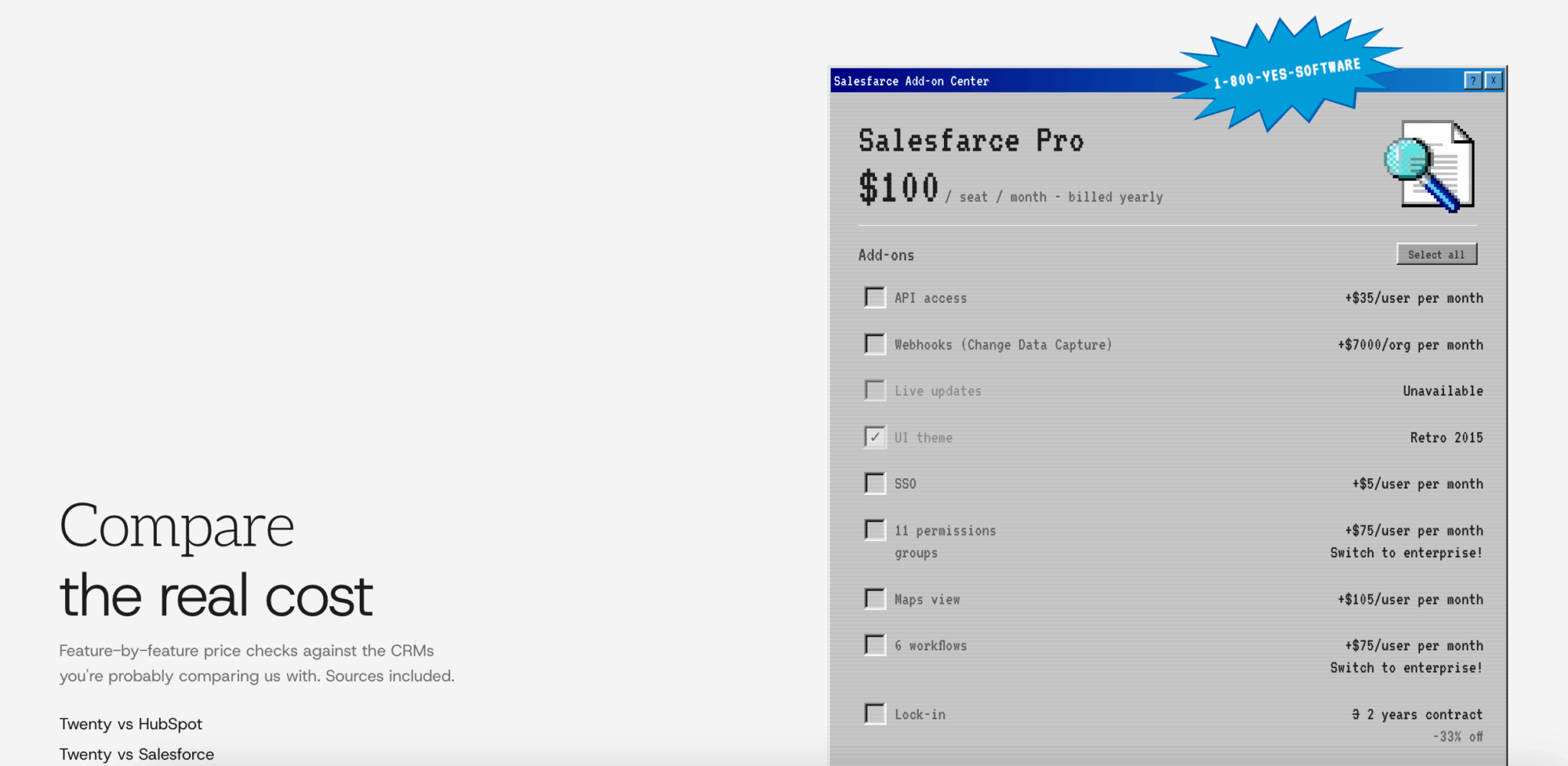
So let us put things plainly. Here is what a sales leadership team finds at Salesforce and will not find at Twenty:
- Revenue forecasting, with stage weighting and per-team projections.
- CPQ, that is, configuring complex quotes with pricing rules.
- Territory management and automatic account assignment.
- Advanced multi-currency.
- A comparable application marketplace, where you plug in a business tool in three clicks.
These gaps are not oversights. They are choices. Twenty was written from a blank page in 2023, it has no twenty years of functional debt to catch up on, and its team owns the decision not to chase parity.
What it built instead is far more interesting: a data model you shape freely, an interface that looks more like Notion than like business software, and full API exposure of everything you create.
Put another way, Twenty is not an enterprise CRM in a free edition. It is a relational database that knows how to hold a sales pipeline. The difference sounds subtle. It nonetheless determines who should adopt it and who should run.
What should Twenty CRM really be compared with ?
If you are hesitating between Twenty and Salesforce, you are not asking the right question. Here is the relevant field of comparison.
| Solution | What it really is | Price range | What you gain by choosing Twenty |
|---|---|---|---|
| Twenty | Open data model with a sales pipeline, extensible in TypeScript | 9 to 19 $ per user, large-account tier separate | The reference point of the comparison |
| Attio | The closest competitor in philosophy: flexible data, modern usability, tech audience | Three to four times more expensive | The source code and the self-hosting option |
| Airtable or Notion | Generic databases you turn into a CRM by hand | Comparable | A pipeline, opportunities and a timeline present natively |
| Pipedrive | The simple, polished sales CRM, designed to sell | Comparable at entry level | Modelling freedom, if your business does not fit the boxes |
| Folk | The light French option, geared to relationships and prospecting | Around double | Modelling depth, if your business objects go beyond the classic contact |
If you are replacing a spreadsheet or a cobbled-together Notion, Twenty is probably the best choice on the market. If you are replacing an established sales CRM, you are going to lose things.
Twenty’s interface: a spreadsheet that learned relationships
First impression on opening it: it does not look like a CRM. A restrained side menu lists your objects, Companies, People, Opportunities, Tasks and Notes, joined by dashboards and workflows.
Every object displays as a table, with the codes of a spreadsheet rather than those of business software:
- Editing happens directly in the cell, without opening a form.
- An Add New row at the bottom of the table creates a record without leaving the view.
- Columns filter, sort and reorder on the fly, and every configuration saves as a view.
- The command-K shortcut opens a universal search and the whole thing can be driven from the keyboard.
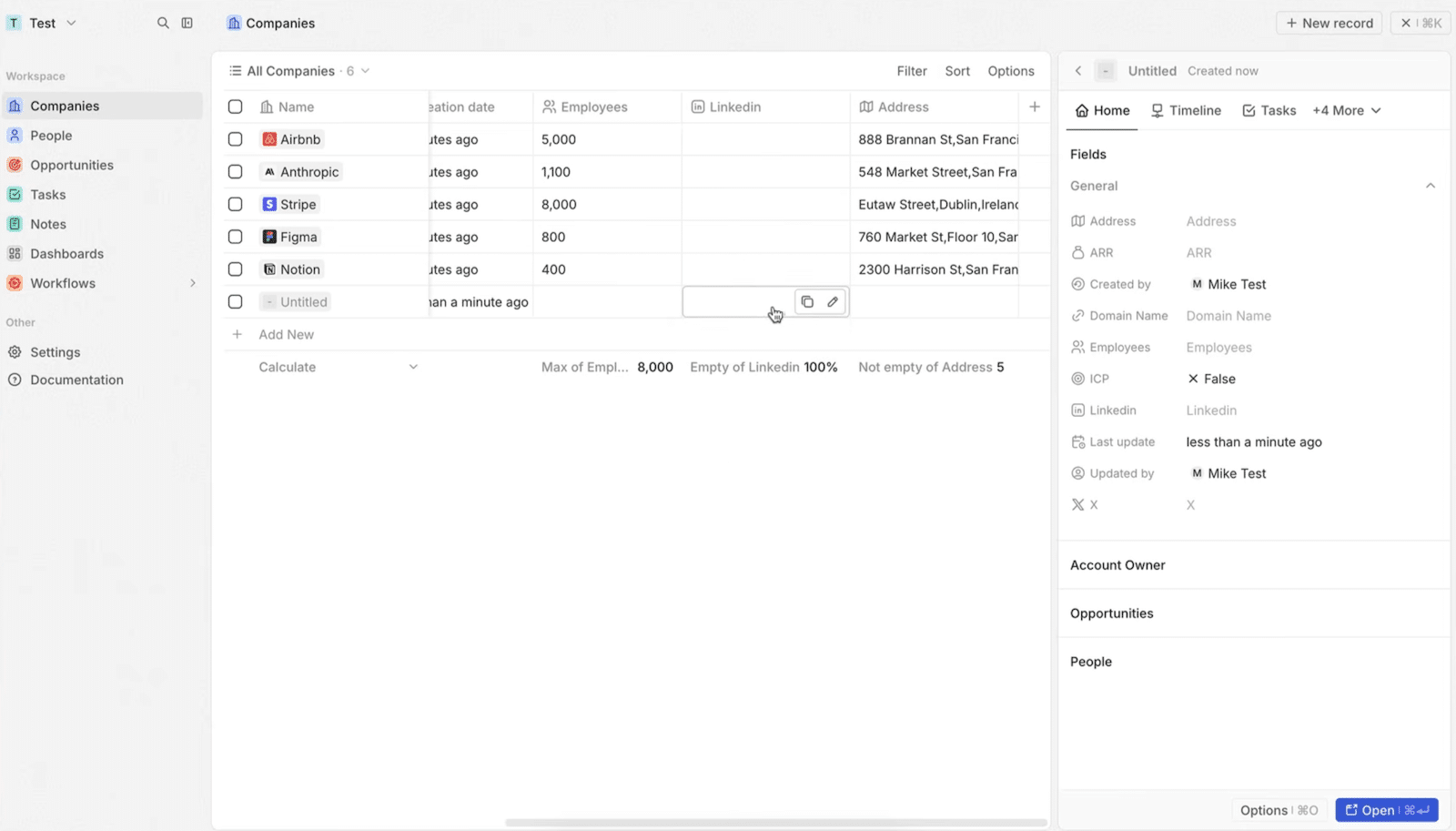
Two details are worth pausing on, because they come back everywhere in the tool:
- The aggregate row at the foot of the table, first. Under each column, you pick a calculation: the maximum of a numeric value, the percentage of empty cells, the number of filled entries, an average. On our sample, Twenty showed 100 % of LinkedIn fields empty that way. This is not a spreadsheet gimmick: it is a permanent record quality indicator, visible without building a single report.
- The side panel, next. Click a row and the record opens on the right, with its fields on one side and its linked objects on the other, without leaving the list. Tabs give access to the timeline, tasks, notes and files. You move from one record to the next without ever reloading a page.
Views also come in kanban and calendar form, each of them saveable and shareable. Getting started is quick for anyone who has already handled Notion or Airtable. It is noticeably less so for a rep used to a classic CRM, and that point weighs in any CRM adoption project.
Account and contact management
Companies
The Companies object arrives pre-equipped with the fields you expect, plus a few you do not: domain name, headcount, address, LinkedIn, X account, ARR and an ICP boolean to flag your target accounts. The company logo is pulled automatically from the domain, which makes lists immediately readable.
Every record also carries its traceability metadata: creator, last modification and who made it. When a record comes from an import or a workflow, Twenty attributes it to “System” rather than to a user. That is a welcome precision when several sources feed your base.
Below the fields, the record lists the linked objects: the account owner, the open opportunities, the people who work there. Everything is clickable, everything attaches by search.
Contacts
Same logic on the People side, with emails, phone numbers and the link to the company. Each contact then inherits the context of their company: its opportunities, the other contacts, the history of exchanges.
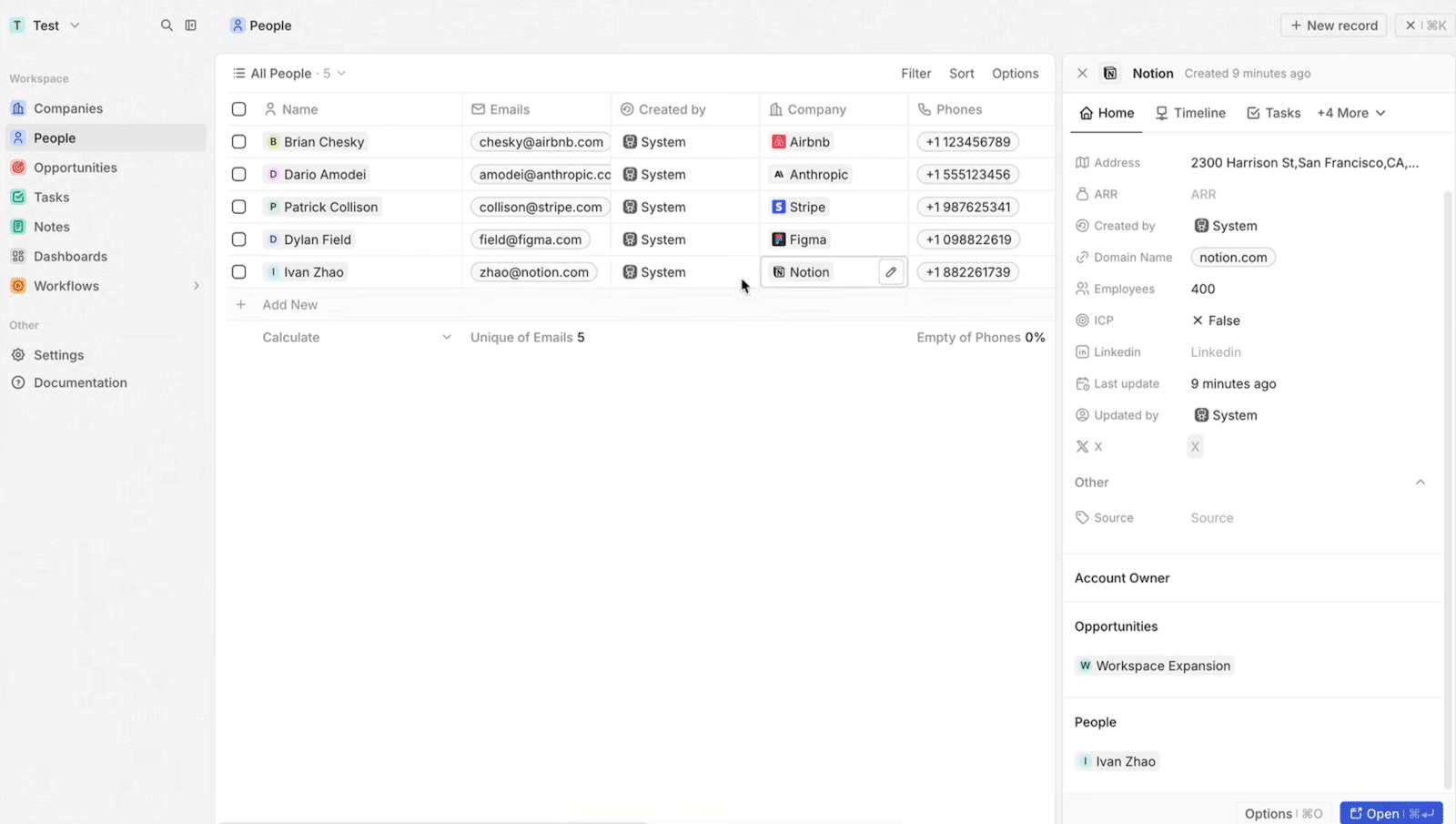
Email and calendar synchronisation is configured in the settings, with Google and Microsoft. Exchanges then flow into the timeline of the records concerned, without copy-pasting.
One limit to know before you commit: there is no native data enrichment. No automatic retrieval of the company registration number, the consolidated headcount or the directors, the way CRMs plugged into a national business registry offer. You fill those fields by import, by API or through a third-party tool.
The sales pipeline and opportunities
This is the block that separates Twenty from a plain Airtable. The Opportunities object arrives with its sales fields: amount, expected close date, linked company, main contact, stage and owner.
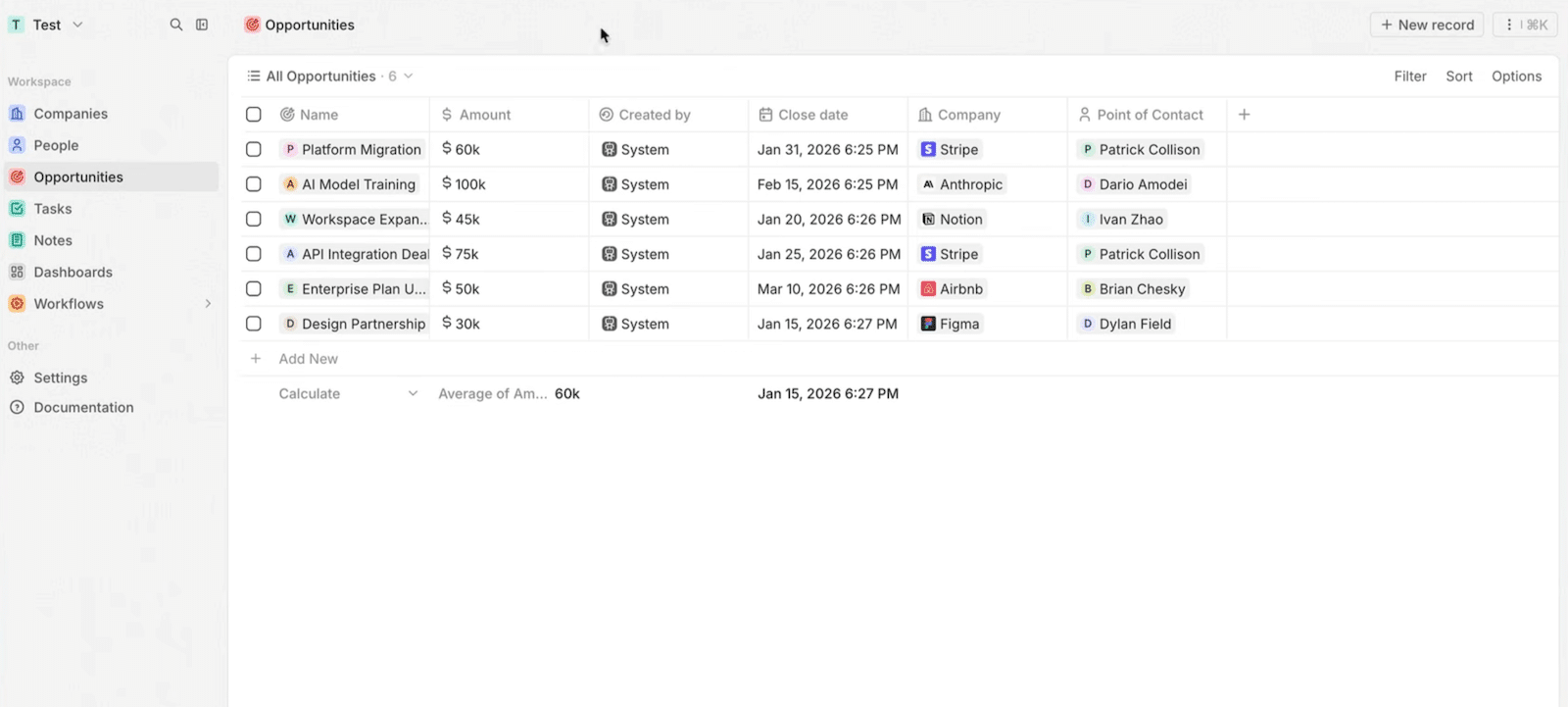
In kanban view, deals move from one stage to the next by drag and drop, the way Pipedrive does it. Stages rename and reorder freely, since it is a selection field like any other. You can also create several opportunity-type objects if your sales pipelines differ too much from one activity to another, something a classic CRM generally charges dearly for.
The aggregate row comes into its own here: total pipeline amount, average deal size, furthest close date, all of it shown under the table and recalculated with every filter.
So much for the good news. Now the limits, and they are sharp:
- No weighting by stage probability, and therefore no weighted pipeline.
- No notion of quota or target.
- No alert on deals that stall.
Twenty stores and displays your pipeline elegantly, it does not run it for you. If the stages of your sales cycle are your main management tool, keep that reservation in mind.
Tasks and notes
Tasks follow the same grammar as the rest: a title, a status, a due date, an owner and above all a relations field that attaches them to any record in your workspace.
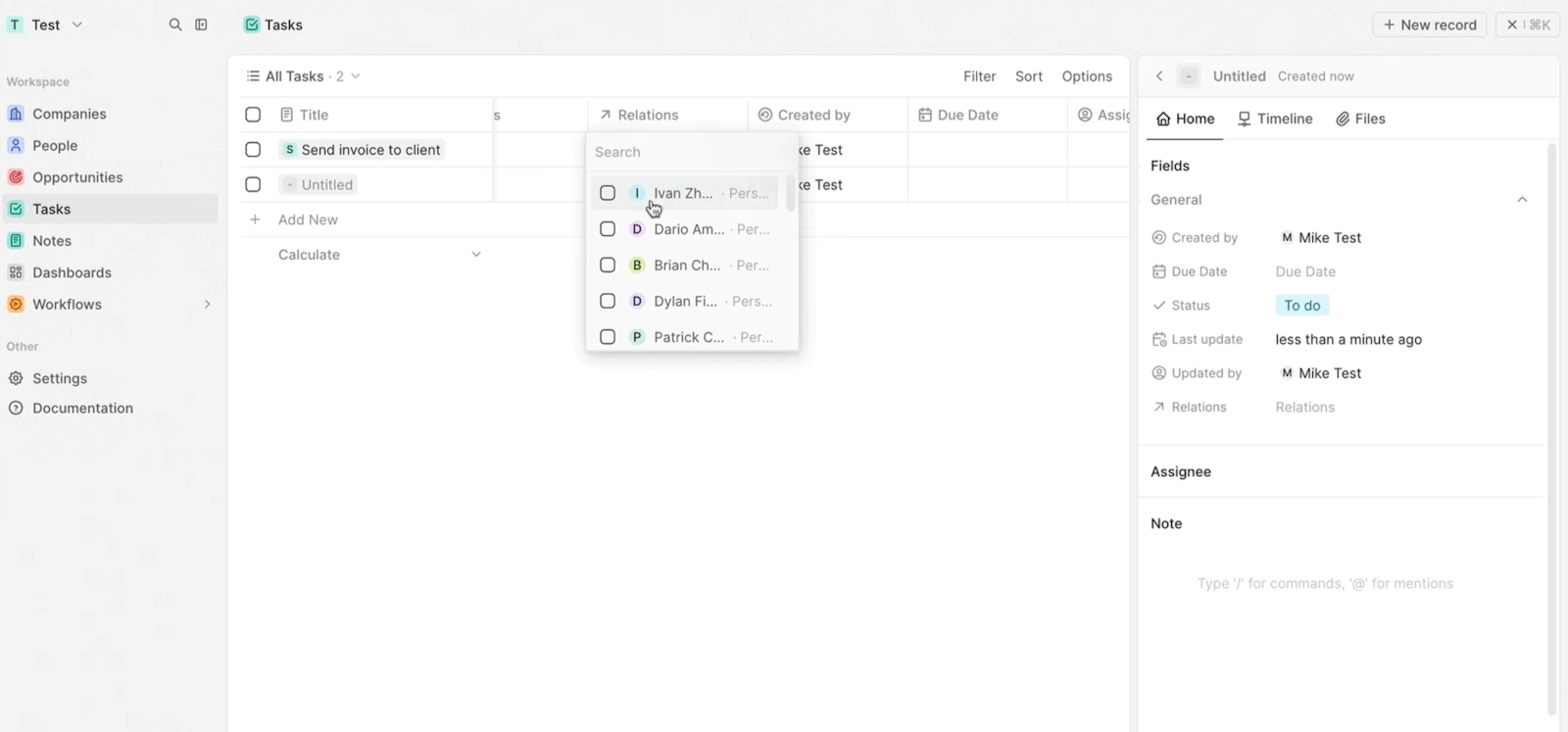
This point deserves underlining. In most CRMs, a task attaches to the objects the vendor planned for and to those alone. Here, since the relations field points to any object, a task can just as well concern a contact as a “Site” or a “Case” you have just created. It is the direct consequence of the open data model.
Notes work like a modern text editor, with slash commands and at-mentions. You can write decent meeting write-ups there, without switching to an external tool.
What is missing, on the other hand: no automated follow-up sequences, no email templates, no smart reminders. Tasks are created by hand or by workflow. For structured outbound prospecting, you will keep your dedicated tool alongside.
The data model: Twenty CRM’s big strength
Here is the heart of the reactor and the only valid reason to pick this tool.
Custom objects, fields, views, layouts, records: all of it is unlimited on both paid plans and the whole thing is configured without code from the settings. You create a “Sites”, “Cases” or “Machines” object in a few minutes, with its attributes and its relationships.
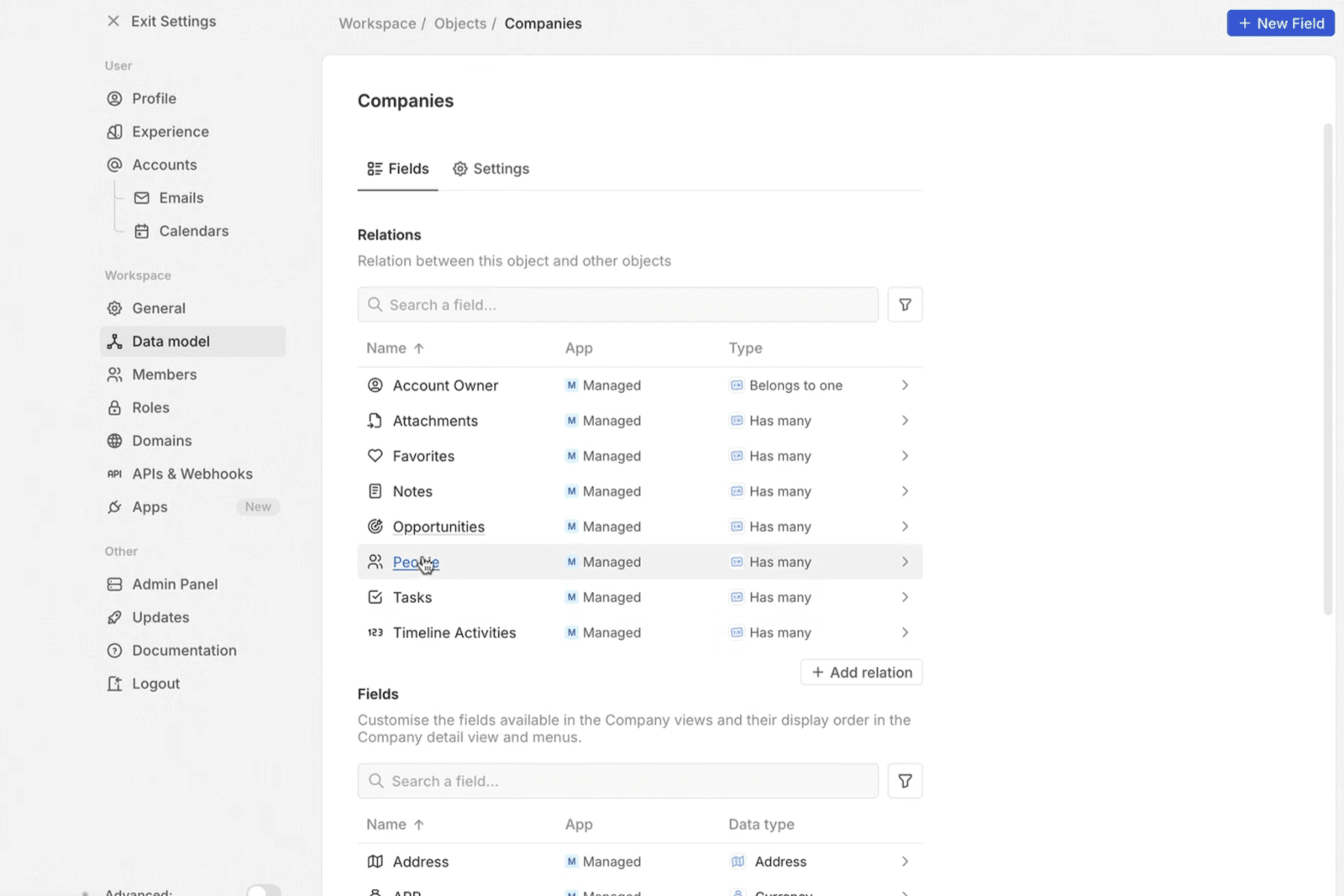
The configuration screen clearly separates two notions:
- The relationships first, with their cardinality made explicit: belongs to a single record, or owns several.
- The fields next, with a precise data type: text, number, currency, address, selection, boolean, link, date. Each element is created, renamed and deactivated individually.
Compare with the competition and the gap jumps out. At Salesforce, custom objects appear from the mid-range plans. At HubSpot, they arrive with the high tiers. Here it is the foundation, from 9 $.
The corollary matters just as much: every object you create is automatically exposed in REST and in GraphQL. You are not waiting for anyone to plug your internal tool into it, and you depend on no vendor roadmap to connect your business system.
This is where your decision plays out, nowhere else. If your business fits inside the contact, company, opportunity triptych, that freedom will do nothing for you and a classic sales CRM will serve you better. If you juggle business objects you currently patch together in a spreadsheet, then Twenty saves you a considerable amount of time and it has no real competitor at this price.
Workflows: automation without code
Automation is built in a visual editor, on a canvas where you chain a trigger and then actions.
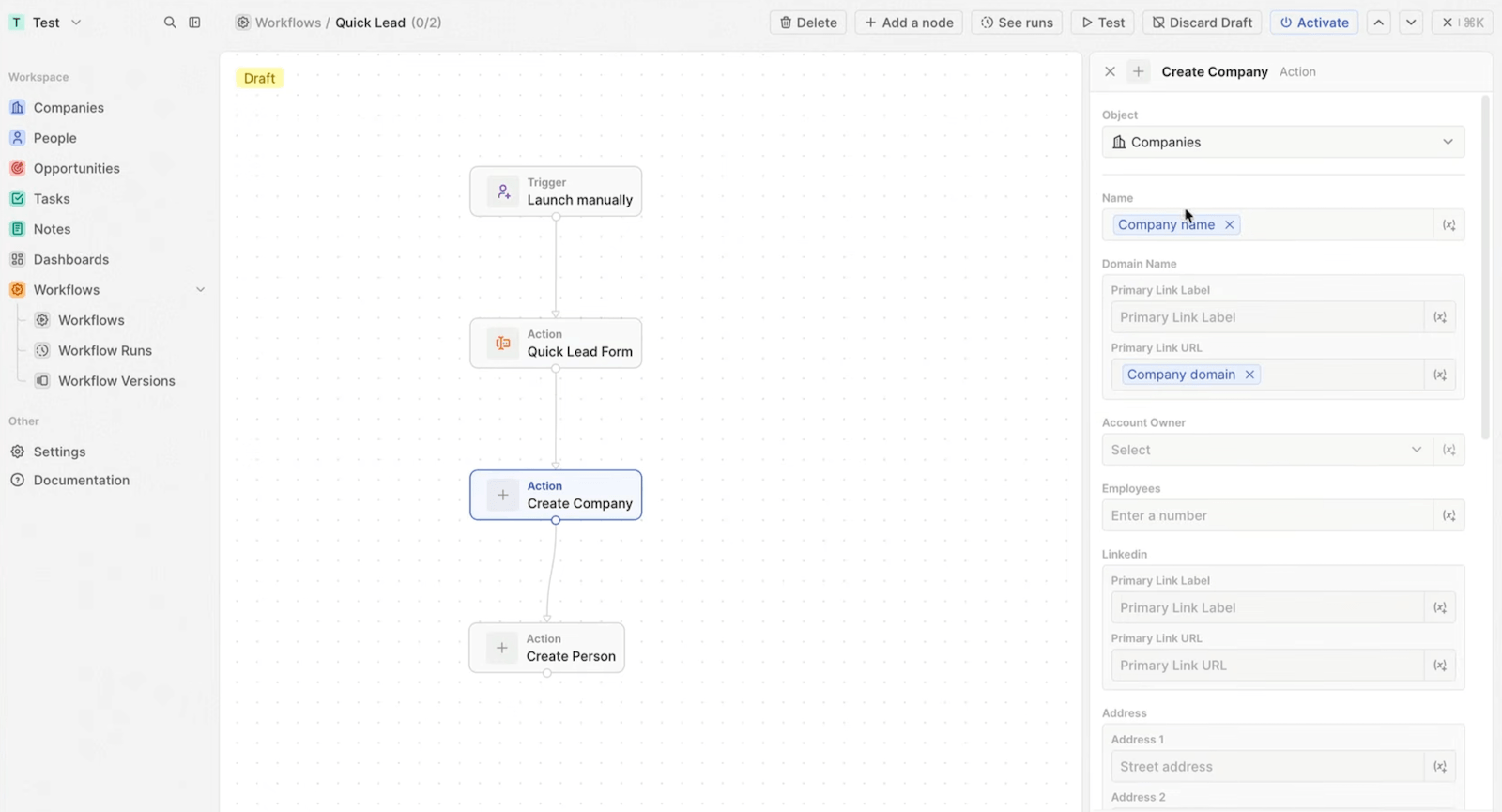
The way it works is classic and effective. You pick a trigger: manual launch, record creation or modification, form submission. You then add nodes: create a company, create a person, update a field, send an HTTP request, run code.
The strong point is in how actions are configured. Every field of the target object can be filled in hard or fed by a variable coming from a previous step. In our test, a capture form fed the name and the domain of the company created, then the person attached right after.
Three serious touches are worth flagging, because they are often missing from competitors of this size:
- A test button that runs the workflow before activation.
- An execution history, to understand what failed and when.
- Workflow versioning, with a draft and an explicit activation, which stops you breaking an automation in production.
The limit lies in the scope of external triggers. Twenty reacts very well to what happens at home, far less to what happens elsewhere. To orchestrate several tools between them, you will go through webhooks or a third-party automation platform.
Reporting and dashboards
Mind the nuance here, because the usual complaint has become half wrong. Twenty ships a real dashboard builder, organised in tabs, where blocks are placed on a grid by drag and drop.
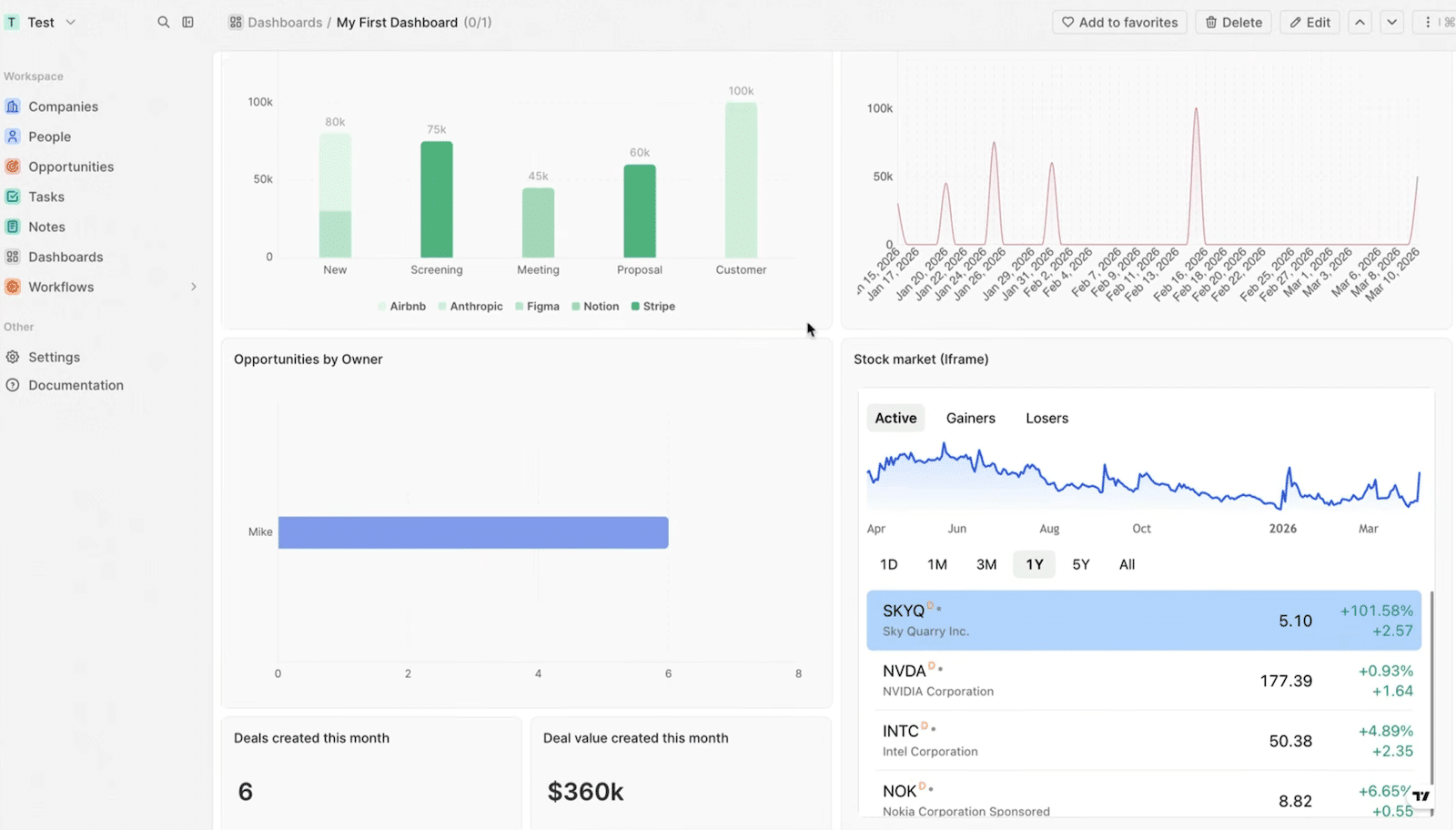
Block types cover the essentials: vertical or horizontal bars, lines, pie chart, single figure indicator, gauge. To which are added a rich text block and an iframe block that embeds an external page in the dashboard.
The chart editor is finer than expected. You pick the source among your objects, you apply a filter, then you configure each axis separately: the data shown, the sort order, the exclusion of null values, the aggregate on the y-axis, a grouping by field. Styling follows, with colours, axis names and label display.
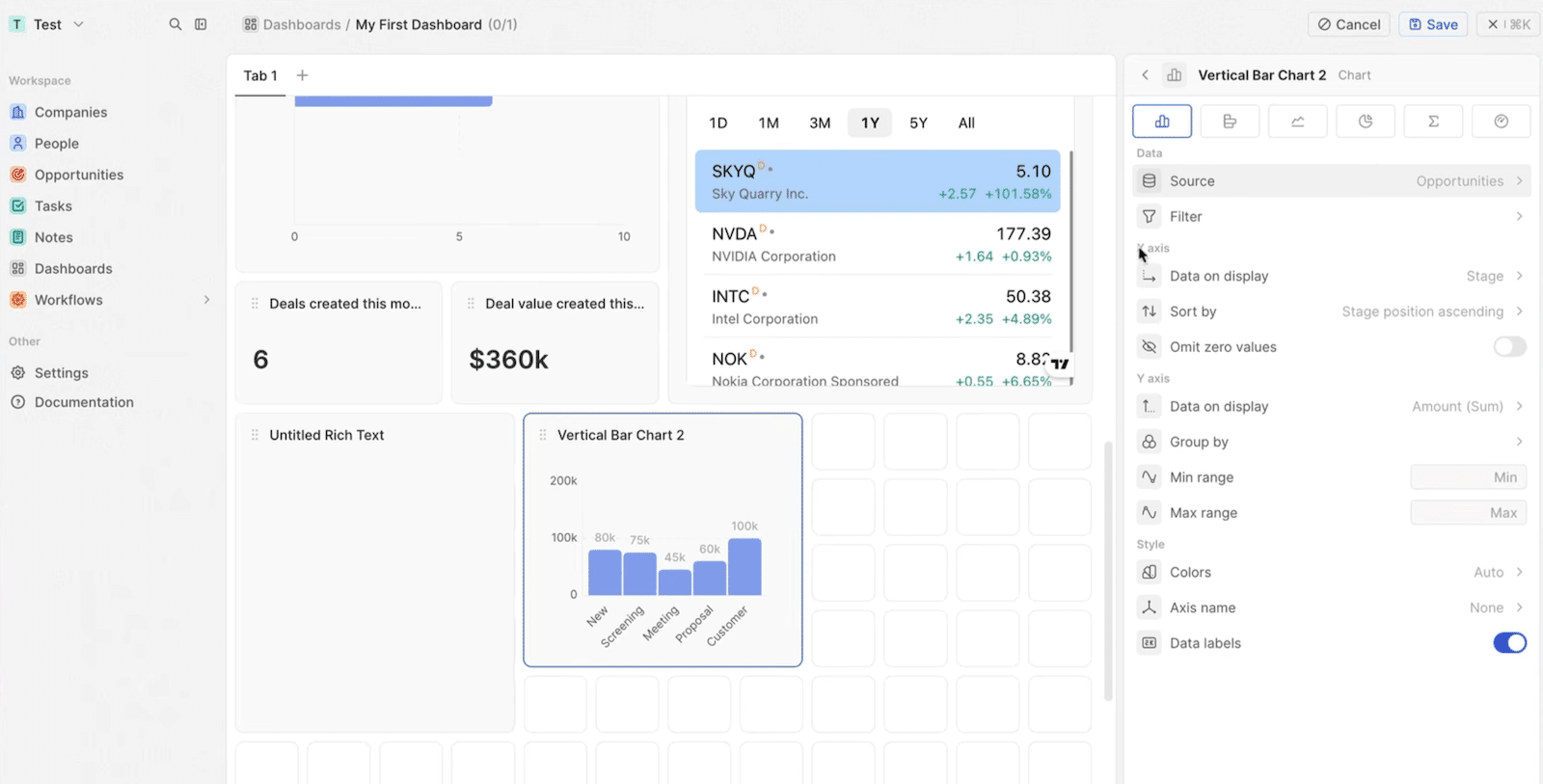
So you get the pipeline split by stage, deal volume per rep or value created over the month without leaving the tool. That is plenty to run a team of ten.
What is missing, on the other hand, is precisely what a structured sales leadership lives on. No weighting of deals by stage probability, no quarterly landing projection, no target or quota tracking per rep. You measure what has happened, you do not project what is going to happen.
You can of course extract everything through the API and plug in your own sales reporting tool. That is even the recommended route as soon as forecasting becomes an issue. You still need someone to build and maintain it, and to know which sales performance indicators you really want to follow.
AI, the MCP server and the application platform
Every cloud workspace ships a native MCP server. You connect Claude, ChatGPT or Cursor through OAuth and the assistant reads then writes in your CRM in natural language.
The use that convinces immediately: asking for deals that have gone quiet for thirty days and then having the follow-ups drafted, all of it fed back into the CRM without going through an export. It is currently one of the rare CRMs to ship this block as standard rather than as an enterprise option, and the gap with the competition here is considerable.
Version 2.0 also moved Twenty from CRM status to that of an application platform. The npx create-twenty-app command generates a complete extension: objects, server-side logic functions, React components that display straight in the interface, views, navigation, plus AI-driven skills and agents. All of it in TypeScript, deployable on any workspace.
Add to that the feature nobody talks about and no competitor offers: versioning your workspace in a git repository, with branches and rollback. Want to test a redesign of your data model ? You create a branch, you try. If it does not stick, you go back.
Compare with the reality of a classic CRM, where changing the data model in production remains a project in its own right, with a paid sandbox and sign-off in committee. That is a difference of nature, not of degree.
Twenty CRM: cloud or self-hosting ?
Here is the argument you often hear: self-hosting is free, so it is cheaper. Let us check.
“Free” concerns the licence, not the total cost. Running Twenty at home means a server with Docker, PostgreSQL and a job queue. Add the backups, the monitoring, the version upgrades and incident handling.
Let us put honest numbers on it. Budget around fifty dollars a month for decent infrastructure, backups included. Add the administration time, valued at 60 euros an hour.
| Administration time | Real monthly cost of self-hosting | Equivalent in Pro seats (9 $) | Equivalent in Organization seats (19 $) |
|---|---|---|---|
| 1 hour a month (optimistic) | around 115 $ | 13 users | 6 users |
| 2 hours a month (realistic) | around 180 $ | 20 users | 10 users |
| 3 hours a month (with incidents) | around 245 $ | 27 users | 13 users |
The threshold therefore depends on the plan you would be aiming at. On Pro, it sits around twenty users. On Organization, twice as expensive per seat, it drops to about ten. Below that, self-hosting costs you more than the cloud. A team of eight pays 72 $ a month on Pro, clearly less than half a day of a developer per quarter.
Remember the rule that follows, it is counter-intuitive: the higher your security and governance requirements, the earlier self-hosting becomes worthwhile. The Enterprise tier, costed below, pushes that logic to the point of absurdity.
Which does not mean you should give up on hosting it yourself. It means you should do it for the right reasons: keeping your data on your infrastructure, or modifying the source code. Never to save 72 $.
One last point before you jump in: version upgrades were long the painful part of self-hosting. Since version 1.22, you can jump straight to the latest version without installing the intermediate ones, and the server applies the migrations on its own at startup. An older instance, though, still has to climb tier by tier up to 1.22. If you are taking over an existing instance, start by looking at its version number. And back up before anything else.
Plans and pricing: what does Twenty CRM really cost ?
Four plans, one of them free:
| Plan | Price | What you get |
|---|---|---|
| Self-hosting | Free licence | The complete product, with no functional throttling. You take on the infrastructure and the running of it. |
| Cloud Pro | 9 $ per user per month annually, 12 $ monthly | Full customisation, bespoke applications, AI agents, MCP server, REST and GraphQL API, unlimited seats, 50 workflow credits a year. |
| Cloud Organization | 19 $ per user per month | Everything in Pro, plus row-level permissions, SAML and OIDC SSO, custom domain name, audit logs, encryption key rotation and priority support. |
| Cloud Enterprise | From 50,000 $ a year | Everything in Organization, plus isolation on a dedicated instance, IP range filtering, SCIM account provisioning, security review and dedicated support with a service commitment. |
The price shown in large type is 9 $. It is nonetheless not the one a structured SMB will pay.
The tipping point comes down to a perfectly ordinary function: making sure each rep only sees their own accounts. Row-level permissions are reserved for Organization. So is SSO, which is enough to disqualify Pro in most companies that have an identity directory. For an organised sales team, Twenty’s real price is 19 $ per user.
It is still unbeatable. Better to announce it up front than to discover it at the end of a demo.
That leaves the third floor, and it is the most instructive. Twenty has opened an Enterprise tier billed from 50,000 $ a year. It unlocks no additional sales feature: only infrastructure and compliance requirements, isolation on a dedicated instance, IP range filtering, automatic account provisioning, security review, service commitment.
Do the conversion. 50,000 $ a year is around 4,200 $ a month, the equivalent of 220 Organization seats. The tier therefore only makes economic sense beyond two hundred users. Below that, you are not paying for the software, you are paying for compliance.
And there, the whole reasoning of the previous section flips over. An SMB of thirty people facing an isolation requirement would go from 570 $ to 4,200 $ a month, for exactly the same sales features. At that level, self-hosting stops being an activist choice: it becomes by far the cheapest option, and it gives you isolation by construction, since the instance runs at your place.
Two limits also slip under the radar:
- 50 workflow credits a year on Pro. If you intend to industrialise your automations, check what your real usage consumes before committing.
- 50 API calls a minute on Pro, 100 on Organization, custom on Enterprise. The ceiling is comfortable for normal use. It becomes restrictive if you synchronise a large volume from an external system.
On migration, import goes through CSV, or through the API beyond 50,000 records. Certified partners take on the full transfer. If that concerns you, our guide to CRM software migration details the traps to anticipate before touching a single file.
The four signals that should make you walk away
One of them is enough to close the debate.
Your reps work on the road
Twenty has no official native mobile app. The experience is limited to a site adapted to small screens and the app sits on the roadmap without a date.
There is nonetheless a native app on both stores, called TwentyMobile. It connects to your instance, scans business cards with local character recognition, takes voice notes and pushes task reminders. It is free and published under an open licence.
It was developed by one person, alone, outside the Twenty team.
That is exactly the promise of open source kept: a gap in the official product filled by its community. It is also exactly its limit. Your mobile access rests on a volunteer project, with no service commitment and no maintenance guarantee. For a field team, that is not a calendar detail, it is a veto. Our comparison of mobile CRMs will point you to safer options on that front.
Your sales leadership runs on forecasts
We saw it above: the dashboards are now decent, but no weighting, no projection and no quota tracking come to complete them. If your board expects a quarterly landing figure, Twenty will not produce it.
Your books of business have to be walled off
On Pro, everyone sees everything. Row-level walls require Organization, so double the price shown. Anticipate it in your budget rather than take it on the chin.
You expect ready-made connectors
Slack, Zapier and the API cover the essentials. Against the thousands of applications the HubSpot or Salesforce marketplaces offer, the gap is stark. Your telephony tool, your enrichment platform or your marketing automation solution probably will not have a native connector.
Nothing insurmountable with webhooks and a bit of code. Except that “a bit of code” is precisely what many teams are trying to avoid by buying a CRM. If you have no technical contact internally, look at CRM integrators before you jump in.
French, yes. Sovereign, that depends on you
Twenty raised 4.7 million euros in late 2024 from Runa Capital, alongside the founders of HubSpot, Front, Cal.com, Sentry and Photoroom. Automattic, the parent company of WordPress, is also on the cap table.
The interface is translated into around thirty languages, English included, the site exists in English and the official directory lists a French partner positioned on self-hosted deployment, public sector included.
So much for the good news. Now the nuance, because it counts: the vendor’s nationality does not determine where your data sits. Twenty’s managed cloud announces no dedicated regional hosting, and the documentation in fact presents self-hosting as the way to meet data residency requirements. If your DPO imposes hosting in a given jurisdiction, the answer is therefore not “Twenty is French”. It is “host it yourself, or go through a partner who will, in a data centre in that jurisdiction”.
That is precisely the case where the cost calculation flips. When sovereignty is a constraint and not a preference, self-hosting stops being a question of savings.